
by Robin Dost
EDIT: If you’re interested in how I efficiently track threat actors such as Gamaredon, feel free to check out my article on a CTI platform I developed: https://blog.synapticsystems.de/following-gamaredons-infrastructure-rotations-using-kraken/
This is the result of a lengthy analysis and study of the Gamaredon UAC-0010 group. I recommend reading my previous articles for more context.
Defending against Gamaredon is uncomfortable not because the group uses particularly advanced malware, but because it forces defenders to question many assumptions that modern security strategies are built on.
Gamaredon does not rely on sophisticated exploits, stealthy implants or long-lived infrastructure. Instead it operates through large volumes of simple scripts, constantly changing delivery mechanisms and an infrastructure that is designed to burn fast and disappear. Indicators of compromise age out quickly, payloads are interchangeable and even the tooling itself adapts once it becomes the subject of analysis.
Over the past months, tracking Gamaredon has felt less like reverse engineering a malware family and more like observing a process in motion. Loader scripts evolve, obfuscation shifts slightly from wave to wave and infrastructure changes just enough to break automated collection pipelines. At times, analysis environments are actively identified and fed with destructive or misleading payloads, which turns the act of investigation itself into a signal the actor seems to react to.
This makes Gamaredon a poor fit for traditional, indicator driven defense models. Blocking hashes, domains or IP addresses provides short-lived relief at best. By the time a rule is deployed, the campaign maybe has already moved on. What remains stable is not the malware, but the behavior: how access is gained, how scripts are executed, how network communication deviates from normal client behavior and how the actor responds when it detects scrutiny.
This article focuses on defensive measures that have proven effective while actively observing Gamaredon operations in the wild. The goal is not to “out-APT” the attacker, but to break the operational assumptions that Gamaredon relies on: permissive script execution, weak visibility into client behavior and an overreliance on static threat intelligence.
Defending against Gamaredon is less about stopping a specific toolset and more about disrupting a workflow. Once that distinction is understood, the problem becomes significantly more manageable 🙂
What End Users Can Do to Reduce Risk
Remember: Gamaredon does not break into systems. It is invited in
1. Attachments are the attack surface
Gamaredon infects systems through spear phishing. End users who have received appropriate training therefore significantly reduce the risk of infection. Modern phishing campaigns, particularly those operated by actors like Gamaredon, do not rely on obvious deception or complex exploit, they exploit trust in routine actions.
An email attachment that appears harmless is can be nothing more than a delivery mechanism for script execution. Shortcuts, script files or archive formats are are instructions, not documents.
For this reason, email attachments should never be opened impulsively. Files originating from unknown senders, unexpected conversations or unclear contexts must always be routed through a defined analysis workflow. This may include automated malware scanning, sandbox execution or escalation to a SOC or security team for manual review.
Treating attachments as executable content rather than documents removes a core assumption attackers rely on: that a single double-click is enough to gain a foothold.
2. “It looks normal” is not a defense
A common assumption in phishing awareness is that malicious emails will “look suspicious.” Misspelled text, strange formatting or obviously fake senders are warning signs. Campaigns operated by Gamaredon routinely break this expectation.
Many of the emails used in these operations are short, plain and unremarkable. They may not contain any obvious red flags, no unusual wording and no visual elements that stand out. In some cases, the message itself is barely relevant at all. The attachment is the real payload.
Relying on visual cues or intuition to assess whether an email is safe is therefore considered to be ineffective. A file does not need to look dangerous to be dangerous. Shortcuts, script files and archived attachments can appear entirely legitimate while silently triggering code execution in the background.
This is intentional. Gamaredon does not attempt to impress the recipient or convince them emotionally. Instead, it blends into routine communication, where opening an attachment feels like a harmless, almost automatic action.
For this reason, the absence of suspicious indicators are better off never be treated as confirmation of safety. Normal looking emails are not evidence of harmless content, they are often the environment in which these campaigns are most successful.
3. Why double-clicking is dangerous
Most people treat double-clicking as a harmless, almost meaningless action. It is how you open a document, check an image,or quickly look at a file someone sent you. From a usability perspective, that makes sense. From a security perspective, it is exactly the problem.
Not every file is a document! Many files are nothing more than instructions telling Windows to execute other programs, run scripts or fetch additional content from the internet. When you double-click those, you are not “previewing” anything. You are actively starting a process chain.
What makes this especially effective is how unspectacular it looks. In many Gamaredon cases the initial file does almost nothing visible. Maybe a window flashes, sometimes nothing happens at all. From the users point of view, that feels like a failed or broken attachment. From the attackers POV the important part already happened: code execution in user context.
This is not accidental. Gamaredon does not need the first file to be powerful. It only needs it to run. The rest can be downloaded, replaced or updated later. The initial step is small, quiet and easy to overlook.
That is why “just opening it to see what it is” is not a safe strategy. With many attachment types, execution is the first and only action. There is no confirmation dialog, no warning and no visible sign that anything meaningful happened until much later, when the real payload is already in place.
tldr: double-clicking is not a neutral action. It is a trust decision and attackers like Gamaredon build their entire delivery chain around the assumption that this trust will be given automatically. Gamaredon can be avoided if you stop trusting the files you are about to open .
As Lenin said “доверяй, но проверяй” 😉
4. Update. Update. Update.
Always keep the software on your system up to date. Gamaredon has actively exploited real-world vulnerabilities, for example a WinRAR vulnerability “CVE-2025-6218” observed in campaigns since late 2025.
This vulnerability allows an attacker to place a malicious file into the Windows startup folder when an archive is opened or extracted. The user may only see a normal archive being unpacked, while persistence is already being established in the background and the system becomes infected after the next reboot. This is exactly the kind of low-effort, high-impact technique that fits Gamaredons operational model.
Keeping your software updated, especially tools that handle downloaded files such as archive managers, removes entire classes of attack techniques.
5. When to escalate
One of the most reliable defenses attackers have is silence.
Not because nothing happened, but because users assume that whatever happened is probably not important enough to bother anyone with.
“This file didn’t open properly”
“The window flashed and disappeared”
“Nothing seems broken so it’s probably fine”
From the perspective of an attacker, this is perfect. Initial access does not necessarily need to be loud, it only needs to be unnoticed.
The first-stage file doesn’t display an error message, ransomware screen or any obvious sign of compromise. It executes, exits and waits for the next step. If no one reports it, there is nothing to investigate, nothing to contain and nothing to learn from.
Users hesitate to report something because they do not want to be wrong, do not want to interrupt anyone or assume that security teams only care once things are clearly broken. Unfortunately, by the time something is clearly broken, the attacker has already achieved most of their objectives.
From a defensive POV the ideal time to escalate is when you are unsure whether something must have happened at all and not when you are sure something malicious happened.
If an attachment behaves strangely or if a file does not open as expected, if a website triggers download you did not request or if anything simply feels off, that is already enough reason to report it. Security teams do not need certainty. They need signals.
It’s better to report one more false positives to your security team then not reporting it.
Yes, most reports will turn out to be harmless. That is fine. What is not fine is missing the few cases that actually matter because no one wanted to be the person who raised a false alarm.
tldr: if something looks broken, weird or pointless, that is not a reason to ignore it. That is exactly when escalation is supposed to happen. The worst possible outcome of reporting is a short investigation. The worst possible outcome of not reporting is an attacker quietly staying in your network.
Defensive Controls for System and Network Administrators
1. Kill the script layer
Gamaredons operations depend almost entirely on script-based execution. VBScript, JS, HTA files and shortcut-based loaders are the foundational tools. Without the ability to execute scripts in user context, the majority of observed Gamaredon infection chains fail before any payload is delivered.
This makes the script execution layer a highly effective choke point for defenders.
In many environments, script interpreters such as wscript.exe, cscript.exeor mshta.exe are still broadly available to all users, despite having little to no legitimate business use. From an attackers perspective, this provides a reliable and low-friction execution environment that does not require exploits, elevated privileges or complex tooling.
Restricting or disabling these components significantly raises the cost of an attack. Blocking mshta.exe entirely, enforcing execution policies for VBScript and JScript and preventing script execution from user-writable locations such as Downloads, Tempor profile directories removes a critical assumption Gamaredon relies on: that scripts will execute by default.
Where complete blocking is not feasible, strict allow-listing needs to be applied. Script execution should be limited to known, signed,and explicitly required use cases. Everything else should fail closed.
It is important to note that this is not merely a prevention measure, but also a detection opportunity. Script-based attacks are very noisy at the process level. Parent-child relationships such as email clients spawning script hosts or shortcut files launching interpreters provide strong, behavior based signals that are far more stable than file hashes or domains.
Defenders mostly focus on detecting the final payload. Against Gamaredon, this approach is too late. By the time a second stage binary is downloaded, the attacker has already achieved their primary goal: execution. Eliminating or tightly controlling the script layer prevents this first and most critical step.
Option 1: Disable mshta.exe
mshta.exe has virtually no legitimate use in modern enterprise environments and is heavily abused by Gamaredon
Applocker
Path Rule: Deny
%SystemRoot%\System32\mshta.exe
%SystemRoot%\SysWOW64\mshta.exe
Action: Deny
User: Everyone
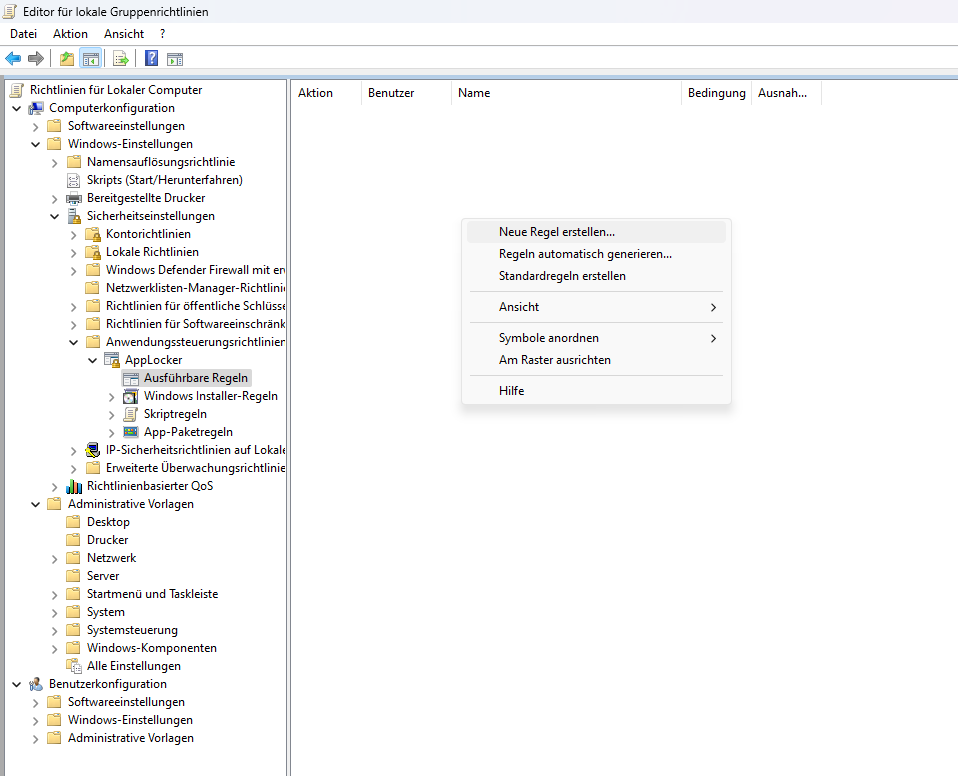
>> Click Create new Rule
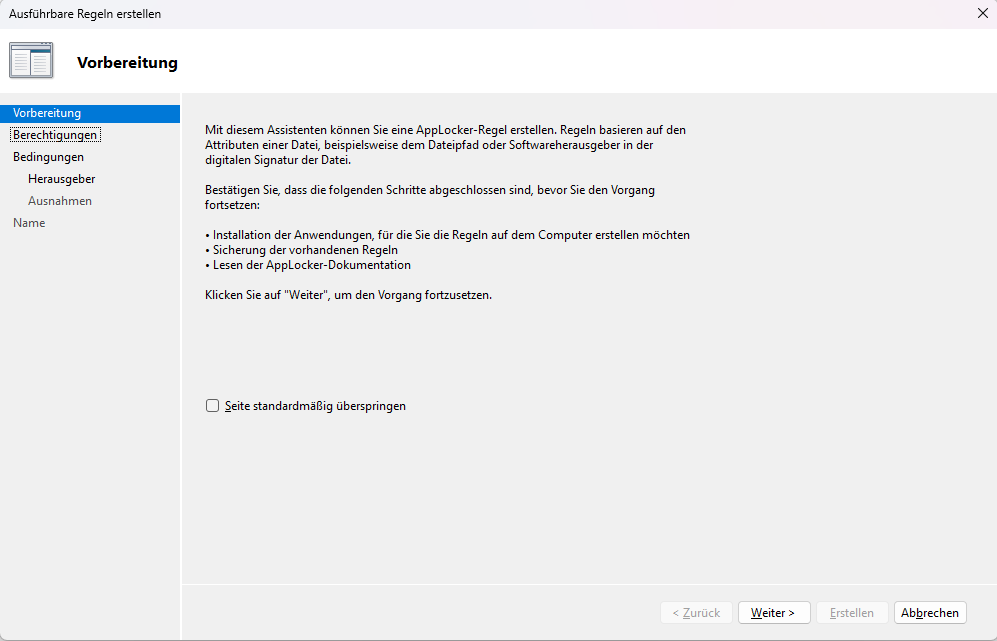
>> Click Continue
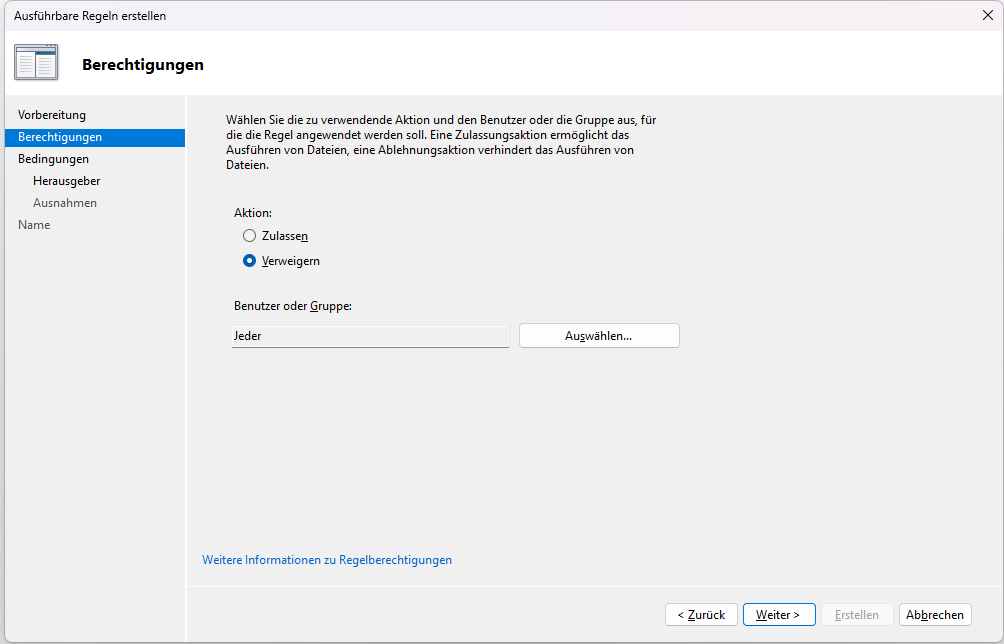
>> Click Continue
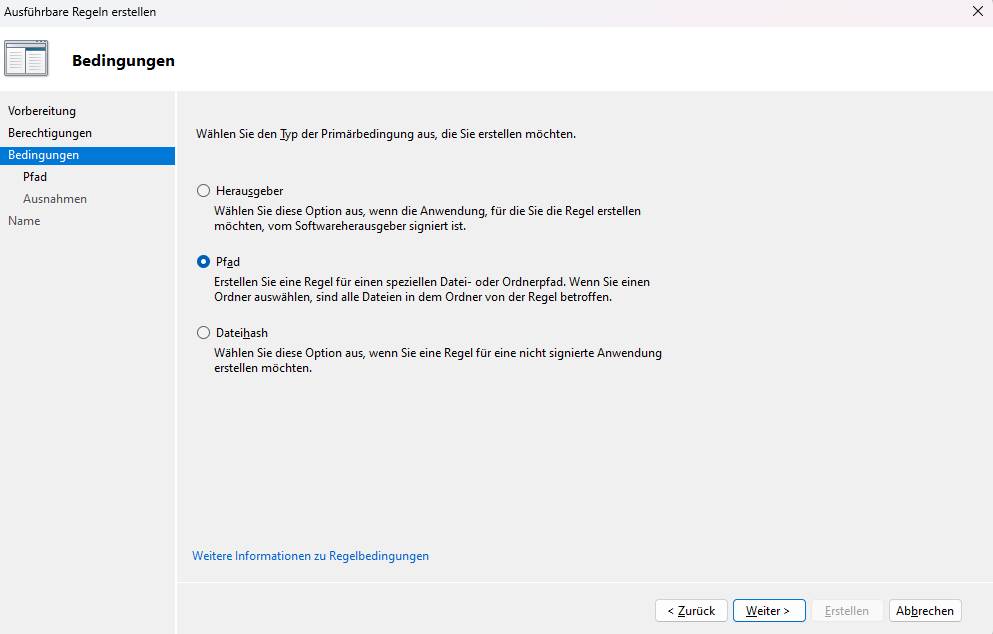
>> Select Path; Click Continue
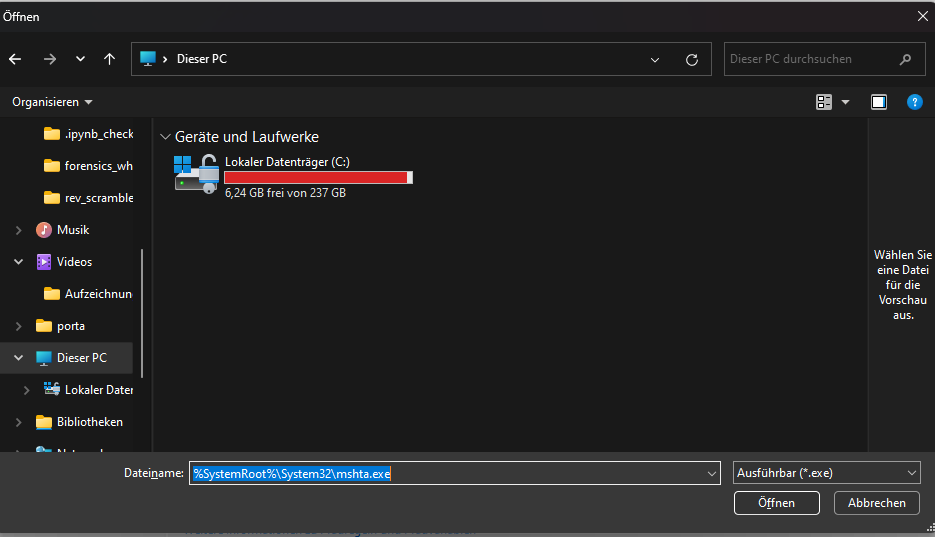
Filename: %SystemRoot%\System32\mshta.exe
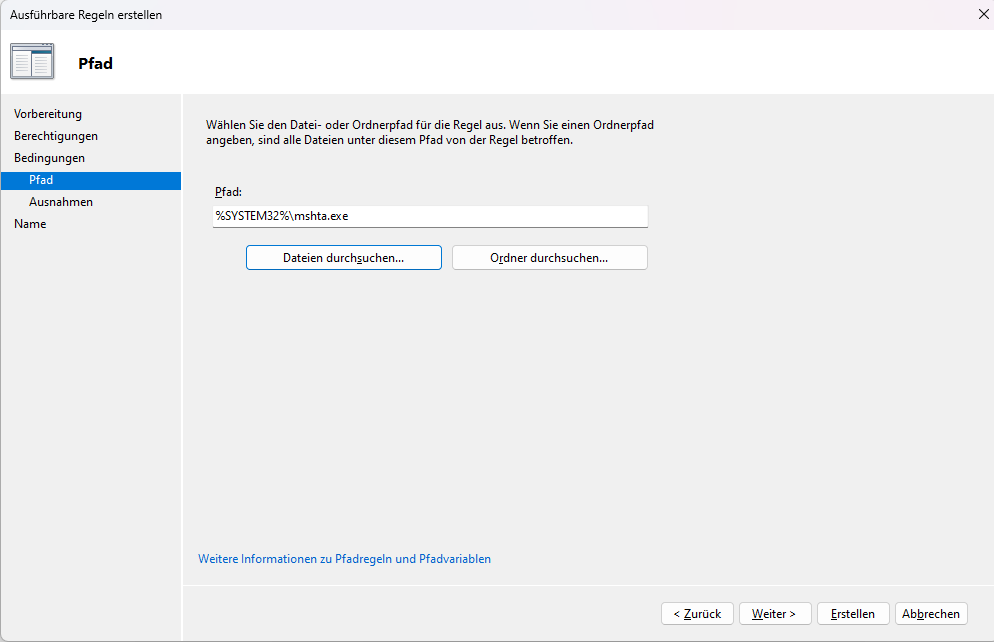
>> Click Create
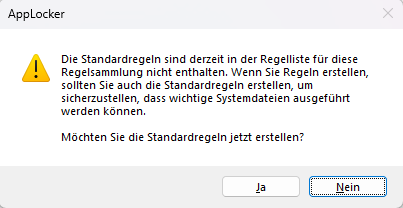
>> Click Yes
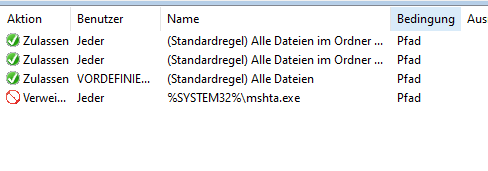
If you had no rules before, it will look like this:
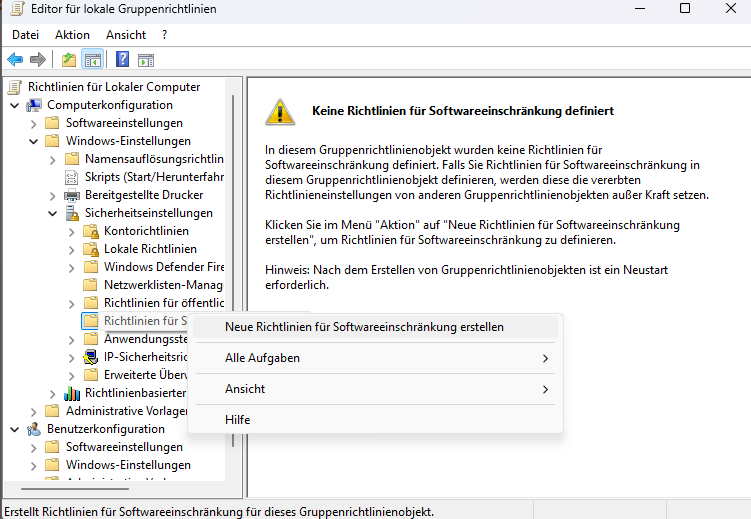
Software Restriction Policies
Legacy but effective
- Open
gpedit.msc - Computer Configuration
> Windows Settings
> Security Settings
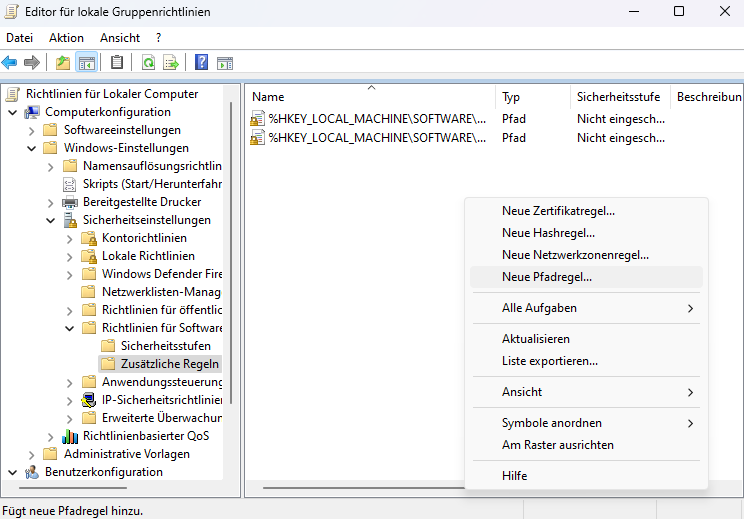
> Software Restriction Policies - Create New Path Rule
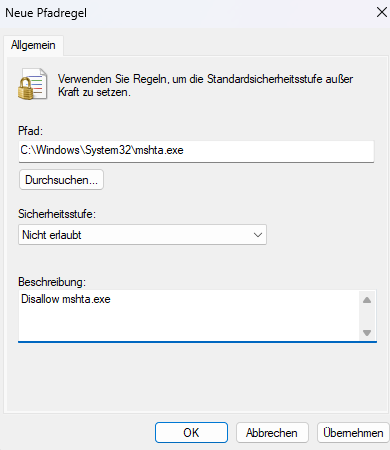
- Path
C:\Windows\System32\mshta.exe - Security Level: Disallowed
Repeat for SysWOW64
Option 2: VBS and JS Restriction
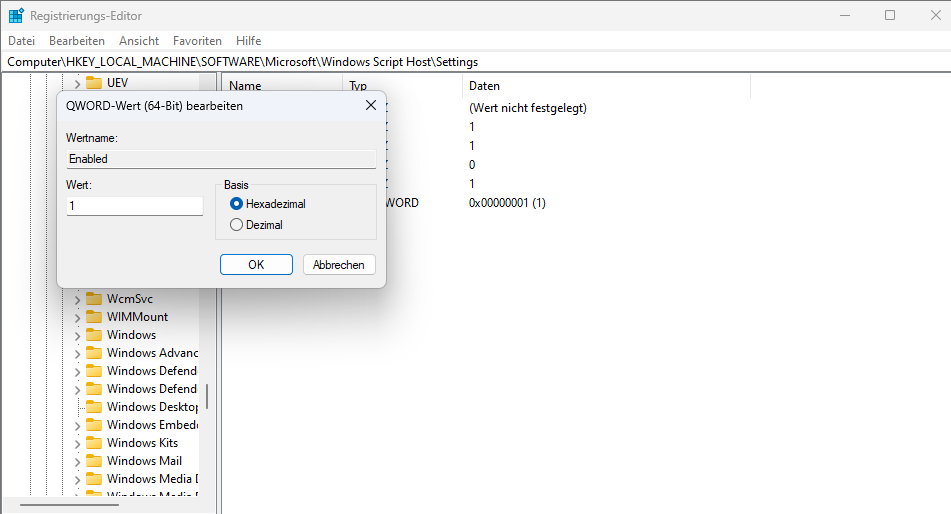
Disable Windows Script Host (WSH), this disables wscript.exe and cscript.exe
Registry (GPO-friendly)
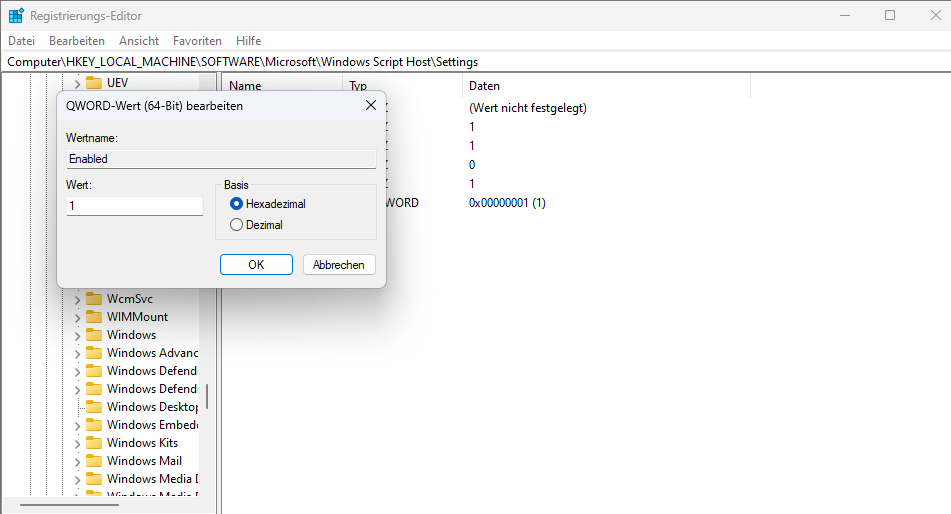
[HKEY_LOCAL_MACHINE\Software\Microsoft\Windows Script Host\Settings]
"Enabled"=dword:00000000
if you want to re-enable
"Enabled"=dword:00000001This alone stops most VBS- and JS-based Gamaredon loaders.
It’s also a good defense against other Threat Actors, since Gamaredon is not the only one to use the methods
You can also do this per user btw:
[HKEY_CURRENT_USER\Software\Microsoft\Windows Script Host\Settings]
"Enabled"=dword:00000000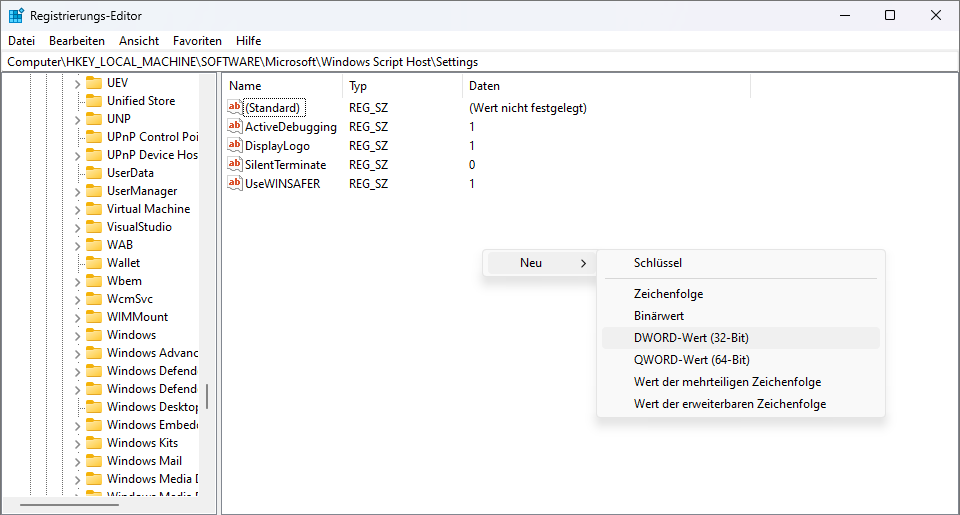
Option 3: Block Script Exec from User-Writable Paths
Gamaredon relies on execution from:
Downloads%TEMP%%APPDATA%- Email attachment paths
Apply to:
.vbs.js.hta.lnk
Prevents double-click execution even if scripts are not fully disabled
Option 4: If Blocking is impossible – Make It Visible
Some environments cannot fully disable scripts. In that case, visibility is mandatory.
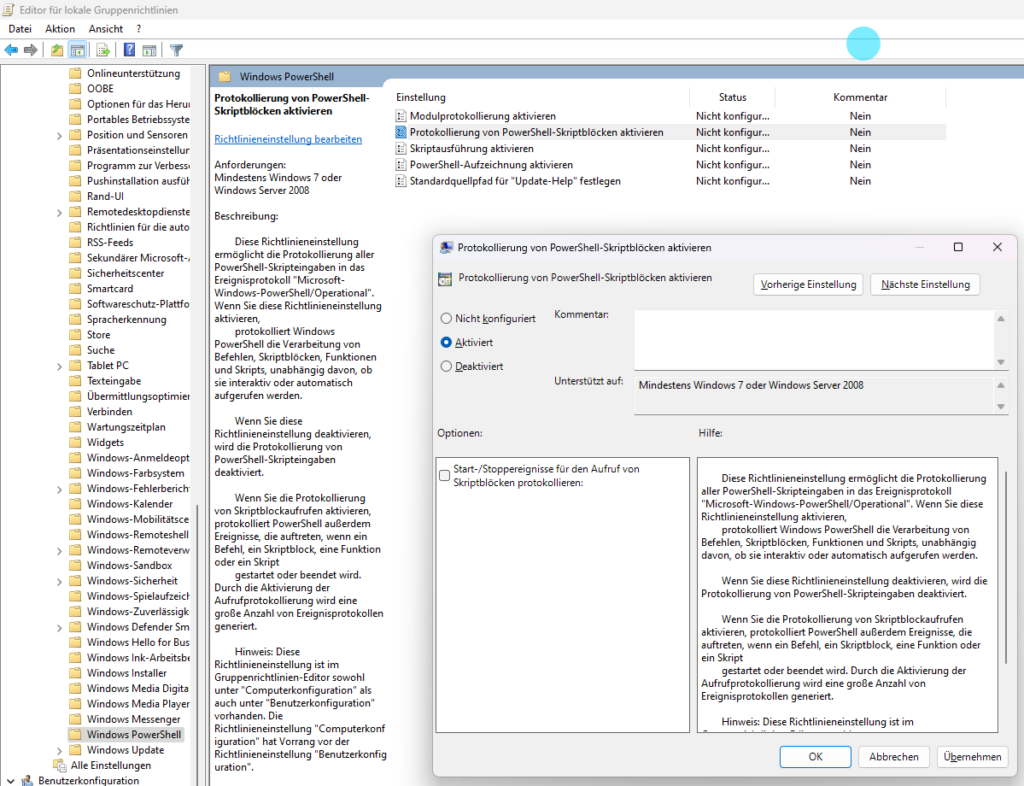
Enable Script Block Logging:
Computer Configuration
> Administrative Templates
  > Windows Components
    > Windows PowerShell
Enable:
- Turn on Script Block Logging
- Turn on Module Logging
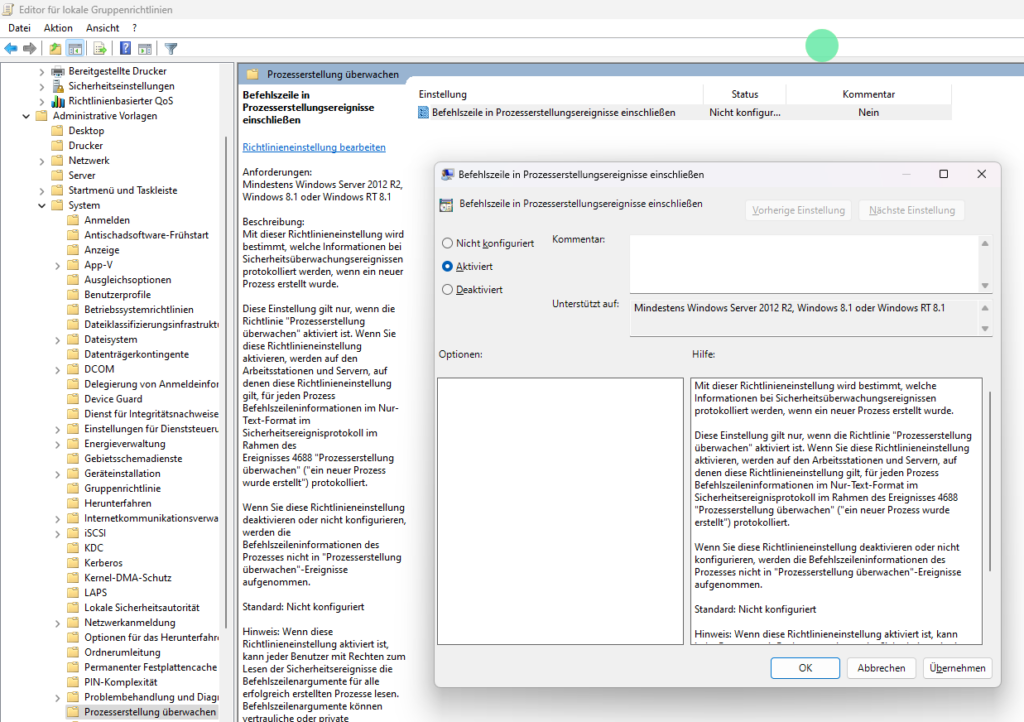
Enable Command Line Proccess Auditing
Computer Configuration
> Administrative Templates
  > System
    > Audit Process Creation
Enable:
- Include command line in process creation events
This enables:
- Event ID
4688 - Parent/Child relationships:
outlook.exe > wscript.exeexplorer.exe > mshta.exe
Option 5: YARA on Email Attachments
One of the most effective defensive layer that is underestimated in Gamaredon-style campaigns is attachment scanning at the email gateway using YARA rules.
A large part of Gamaredons initial access relies on script-based loaders delivered directly as attachments (HTA, VBS, JS, LNK) most of the time inside archives (abusing Winrar CVE since end of 2025), scanning files before they ever reach the user can break the infection chain at the earliest possible stage.
YARA is particularly useful here because it does not rely on file hashes or exact filenames. Structural patterns, script constructs and typical obfuscation techniques tend to remain relatively stable even when the surrounding delivery changes. That makes YARA a good fit for detecting families of loaders rather than individual samples.
Applied at the mail gateway or in attachment processing pipelines, YARA rules can prevent execution entirely instead of trying to detect activity after the user already clicked the file. From a defensive POV, that is always the better place to intervene.
I maintain a set of YARA rules specifically focused on Gamaredon loader patterns, including HTA- and VBScript-based stages observed from older and recent campaigns. These rules are meant for legitimate research and defensive use. If you are working in a security or incident response context and want to test or deploy them, feel free to contact me and I can provide them for evaluation and tuning.
YARA will not stop infrastructure shifts or payload changes, but it is very effective at removing large parts of the delivery layer that Gamaredon depends on. Combined with script execution controls and network visibility (read above), it significantly reduces the attackers room to operate.
Option 6: Shortcut (LNK) Abuse Mitigation
Gamaredon frequently abuses .lnk files as script launchers.
Controls:
- Block
.lnkexecution from email attachment paths - Alert on:
- LNK spawning
wscript,mshta,powershell
- LNK spawning
- Disable preview handlers for LNK in mail clients if possible
Option 7: Block / Restrict bitsadmin
This should be an addition, not just an option
As a fallback for msxmlhttp, Gamaredon introduced bitsadmin in their newest Gamaload Samples as an additional fallback, you can read more about it here.
Disabling BITS entirely is not an option in most enterprise environments.
Windows Update, Defender, SCCM and many enterprise management tools depend on it.
Breaking BITS usually means breaking business.
The goal is therefore not to kill BITS, but to remove its value as a reliable malware loader.
Gamaredon doesn’t need stealthy tooling. They need something that works everywhere, survives bad networks and doesn’t get blocked. If you take away that reliability, the technique quickly becomes unattractive.
Below are several practical controls that achieve exactly that:
Block bitsadmin.exe, not BITS
bitsadmin.exe is merely a legacy command-line frontend for BITS.
Modern software uses PowerShell or native APIs instead. In most environments, nothing legitimate depends on interactive use of bitsadmin.exe.
Control
Block the binary using AppLocker or WDAC:
%SystemRoot%\System32\bitsadmin.exe
%SystemRoot%\SysWOW64\bitsadmin.exe
Scope: non-admin or Everyone, depending on your policy
Impact
- Windows Update continues to work
- Defender continues to work
- SCCM and management tooling remain unaffected
- But… Malware loses the easiest way to create BITS jobs
Why this hurts Gamaredon
Gamaredons loaders frequently invoke BITS directly from scripts and HTA stages.
They rely on simple CLI execution, not on robust API-based fallbacks. Blocking the binary often breaks the entire staging chain
Restrict Where BITS Is Allowed to Connect
BITS traffic is still regular HTTP/HTTPS traffic.
It can and should be controlled at the network layer!
Control
On proxy or firewall level:
- Allow BITS traffic only to:
- Microsoft update endpoints
- Internal patching infrastructure
- Explicitly approved business domains
- Block or inspect everything else.
Optional detection:
- Alert on
User-Agent: Microsoft BITS/*connecting to non-whitelisted domains.
Impact
- Business traffic remains unaffected
- Updates continue to function
- External drop servers used by attackers fail reliably!
This is a strong IOC-less control that scales well in enterprise environments 🙂
Disrupt BITS Job Persistence
One of BITS advantages for attackers is job persistence:
jobs survive logoffs, reboots and network interruptions.
Removing that persistence dramatically reduces reliability for staged malware delivery.
Control
Regularly purge queued jobs:
PowerShell example:
Get-BitsTransfer -AllUsers | Remove-BitsTransferSchedule this on workstations every 30–60 minutes (adjust to your needs)
Impact
- Normal short-lived update jobs typically complete unaffected
- Malware loses reliable staging and retry capability
Use caution during large enterprise software rollouts, this is also not the most effective way imo
Enforce Strong Telemetry on BITS Usage
As I already mentioned, if you cannot block it safely everywhere, make abuse visible!
Control
- Enable command-line process auditing
- Monitor:
- Execution of
bitsadmin.exe - Parent processes such as
mshta.exe,wscript.exe
- Execution of
- Correlate with network destinations and file writes
Impact
- No production risk
- High-quality detection signal
- Low false-positive rate
Remember: BITS usage initiated from scripting engines is rarely legitimate
Behavioral Heuristics for BITS Abuse
For mature environments and advanced detection platforms:
Monitor for suspicious patterns such as:
- BITS downloads into:
%TEMP%%APPDATA%- User profile writable paths
- Randomized file names
- Short-lived jobs followed immediately by execution
- Non-corporate TLS destinations
This can be implemented via:
- ETW telemetry
- Defender Advanced Hunting
- Custom sensors and collectors
Provides behavioral detection without relying on static indicators
Visibility beats prevention
At minimum, you need to have visibility into:
wscript.exe(classic VBS/JS execution)cscript.exe(same, console version)mshta.exe(HTA execution, including embedded VBScript/JS)powershell.exe(still relevant, second stage)
But execution alone is only half of the picture here.
In Gamaredon campaigns script hosts are usually paired with built-in Windows networking components, MSXMLHTTP.
Inside the script, outbound communication is handled via this compnents (mostly):
MSXML2.XMLHTTPMSXML2.ServerXMLHTTP
From the outside, this generally looks like a normal process making web requests. There is no external downloader, no suspicious binary and no obvious command line indicator, since everything happens inside the script host process itself.
That means defenders should not only care that a script host started, but also whether that process immediately initiated network connections. Script execution without network activity might be a test or a failure. Script execution followed by HTTP traffic is the actual attack.
If your telemetry cannot correlate:
- script execution
- with outbound connections
- and with the destination domain or IP
then you are missing the exact phase where Gamaredon (or other Threat Actors) transitions from initial access to payload delivery.
tldr; seeing the script start is useful. Seeing the script talking to the internet is what actually tells you that the infection chain is active
Alert on Parent-Child Process Chains, Not on Filenames
Gamaredon changes filenames constantly. That is not where stability is.
What does not change:
- Email client -> script host
- Explorer -> shortcut -> script host
- Script host -> network activity
Those relationships are far more reliable than any hash or URL
If your detection logic is still focused on “known bad files”, you are solving yesterdays problem. Behavior survives infrastructure rotation … but IOCs do not
Treat Failed Infections as Intelligence, Not as Non-Events
One of the more frustrating patterns when tracking Gamaredon is how many times infection attempts partially fail. The loader runs, the payload is blocked or the network request never completes.
From an incident-response POV it could be treated as “problem solved”.
From an intelligence perspective, i think that it’s a gift.
Those events tell you:
- Which attachment types are used
- Which execution paths are attempted
- Which infrastructure is currently active
If you only investigate successful infections, you will always be late. The campaigns that fail today are the ones that succeed tomorrow with minor adjustments. If you understand Gamaredon properly, you can always be a step ahead.
Accept That Something Will Slip Through – Just Plan Around That
Perfect prevention is a nice idea, but ideas are just ideas. It is not how real environments work.
Gamaredon does not need persistence for months. It needs minutes of execution. If those minutes go unnoticed, the damage is already done, regardless of whether the payload later gets removed.
Your defensive strategy needs to assume:
- Some scripts will execute
- Some attachments will be opened
- Some rules will be bypassed
The question here is whether anyone notices in time to react.
Visibility does not replace prevention at all. But without visibility, prevention failures become silent compromises. And silent compromises are exactly what this actor benefits from. You could say that visibility complement your prevention efforts.
Network controls that matter
From a network POV, Gamaredon is not noisy. It does not deploy custom backdoors that beacon every few seconds and it does not rely on exotic protocols. Most of the traffic is simple http(s) generated directly from scripts using tools like MSXML2.XMLHTTP.
That has two important consequences for defenders.
First, there is no separate downloader process to catch.
The same process that executed the script is now making web requests. Just mshta.exe or wscript.exe talking to the internet like a perfectly normal Windows application.
Second, many network controls are designed around detecting known bad destinations, not suspicious clients. If you only look at where traffic goes, but not who is sending it and under which circumstances, you miss the entire initial delivery phase.
For Gamaredon style campaigns network defense has to focus on context, NOT just destination.
Correlate Network Traffic With Process Activity
If a script host executes and immediately initiates outbound connections, that is not normal workstation behavior.
At minimum, be able to answer:
- Which process opened the connection?
- What launched that process?
- What file triggered the execution?
MSXMLHTTP-based traffic will look perfectly legitimate on the wire unless you know it came from a script that just executed from a mail attachment.
Normalize Outbound HTTP Behavior
One of the more uncomfortable lessons when tracking Gamaredon is that attackers actively use network behavior itself as a detection mechanism.
In several waves, delivery depended on whether certain headers, (in the latest Gamaload Samples) especially Content-Length, matched what the script originally set. Many commercial proxy setups modify requests by:
- re-encoding bodies
- switching between chunked and fixed-length transfers
- inspecting and rewriting traffic
From the attackers side, that becomes a cheap and reliable way to identify analysis environments and block payload delivery.
Defensively, this means:
- Outbound traffic needs to be as predictable and uniform as possible
- Proxy behavior should be consistent across user and analysis environments
- Sudden header manipulation should be considered a detection signal, not just a networking detail!!!
Otherwise, you end up with the worst possible situation:
real users get infected, while analysis systems receive fake or destructive payloads
DNS as a detection surface
Treat DynDNS and Low-Rep Domains as High-Risk by Default
Gamaredon infrastructure heavily relies on:
- dynamic DNS providers
- rapidly changing subdomains
- short-lived hosting setups
Blocking individual domains is pointless. They rotate too fast. What does not change is the type of infrastructure being used.
From a defensive standpoint, this means:
- DynDNS traffic has to be restricted, monitored or at least flagged
- Newly registered domains should not be treated the same as established ones
- DNS telemetry is worth as part of detection logic, not just resolution
If your network policy implicitly trusts any domain that resolves, you are trusting exactly the layer Gamaredon is built on
What to Monitor Instead of Chasing Domains
DNS telemetry provides several signals that remain useful even when infrastructure rotates:
- Domain age
Newly registered domains should be treated different from domains that have existed for years. Many Gamaredon delivery endpoints fall into the “new/very new” category. - Provider patterns
Certain DynDNS and free subdomain services appear repeatedly across campaigns. - Subdomain churn
Rapidly changing subdomains under the same parent domain are a common pattern. This is not normal behavior for most legitimate services used by end users. - NXDOMAIN spikes
Failed dns lookups shortly before successful connections can indicate scripted discovery or fallback logic inside loaders.
Since this is very common, you can use this as a strong pattern for finding Gamaredon related activity.
You can detect it, even if timeouts and sleeps are enabled.
None of these signals alone prove malicious intent itself, but together they describe infrastructure behavior that is/could be highly consistent with how Gamaredon operates.
Once this dynamic is understood, the operational flexibility that makes Gamaredon effective becomes a liability that defenders can exploit 🙂
Restriction Beats Blacklisting
If possible, access to high-risk DNS categories have to be restricted by policy, not just monitored.
This can include:
- blocking or limiting known DynDNS providers
- forcing additional inspection or logging for low-reputation domains
- isolating traffic to newly registered domains
The goal is not to eliminate all risk (that is unrealistic) but to reduce the attackers ability to operate entirely in disposable infrastructure without triggering any response.
Gamaredon depends on infrastructure that can be replaced quickly and cheaply. Defensive strategies have to make that approach operationally expensive instead of operationally invisible.
DNS Is Not Just Plumbing
In many environments, DNS is treated as a purely technical service: something that resolves names and moves on. From a threat detection perspective, that is a wasted opportunity.
DNS shows:
- where systems are trying to go
- how often endpoints change
- whether communication targets look stable or disposable
Especially in script-driven infection chains, DNS can be the first external signal that something has moved from local execution to external communication.
If DNS data is not included in your detection logic, then a large portion of Gamaredon activity will look like harmless background traffic until much later in the attack chain.
In my opinion, proper DNS logging should always be included a defensive strategy, regardless of which threat actor you are dealing with.
Prepare for anti-analysis
One thing that becomes obvious to me when tracking Gamaredon over time is that they do not just try to avoid detection, they actively react to analysis.
Payload delivery and script behavior can change depending on the environment. Analysis systems may receive different payloads, broken samples or nothing at all, while real victims get fully functional stages. What you see in a sandbox is not always what happens in the wild.
This means relying on a single analysis setup is risky. If all samples run through the same sandbox, the same proxy and the same network profile, that environment becomes easy to fingerprint and easy to avoid.
Analysis systems should look as boring and realistic as possible.
The takeaway from my analysis is simple: when the attacker adapts to being observed, your analysis pipeline becomes part the attack surface. If you do not account for that, you may be analyzing exactly what the attacker wants you to see
More information
If you want to know more about Gamaredn, check out my latest articles:
2 Responses to “Defending Against Gamaredon: Practical Controls That Actually Work”